Corosa: A Powerpoint Template for Modern Branding
Let’s be honest: starting from a blank PowerPoint slide is intimidating. You stare at a white void, wondering where to place the logo, how to size the chart, or whether that shade of blue works with your font. Most business owners, marketers, and creative professionals don’t have hours to waste on formatting. What you need is a foundation that lets you focus on the story instead of the mechanics. This is exactly where Corosa - Powerpoint Template comes into play. It is a complete visual system designed to help you communicate professionally, without the usual headache.
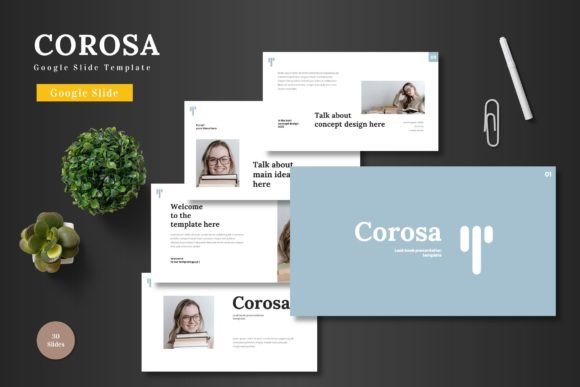
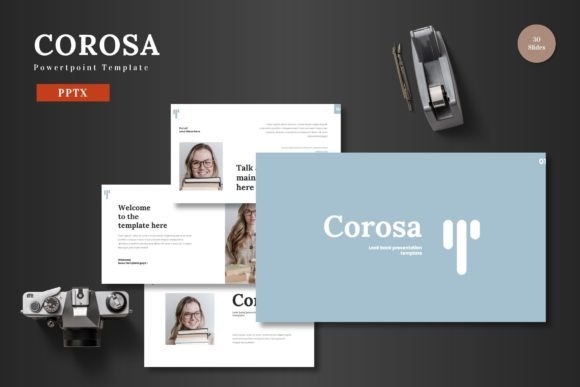
Corosa brings together clean aesthetics and serious practicality. With 150 total slides spread across 5 premade colors, it offers the kind of flexibility that small business owners and creative professionals need. Whether you are building a brand identity deck for a client or a quarterly review for your team, this template provides a solid foundation. The design leans on a modern, scalable structure—think ample white space, thoughtful infographics, and a color palette that feels contemporary without being distracting. It’s built for speed, but designed for impact.
A Toolkit Built for Speed and Consistency
One of the standout features of Corosa is its reliance on master slides. This isn’t just a collection of disconnected pages; it’s a cohesive system. When you edit a master slide, every slide built from it updates automatically. This is a massive time-saver for marketers and entrepreneurs who need to produce consistent material quickly. The handcrafted infographics are pixel-perfect and fully editable. You don’t need to be a graphic designer to create compelling data visualizations—just drop in your numbers and let the template do the heavy lifting.
The 150 slides might sound like a lot, but having that variety means you never have to build a slide from scratch. You get 5 complete color variations, each with 30 slides. This gives you enough runway for a long-form pitch deck, a detailed product launch, or even a full set of brand guidelines. The section break slides are particularly useful for segmenting your narrative, keeping your audience oriented throughout the presentation. For content creators and hobbyists, this level of structure removes the guesswork. For entrepreneurs, it builds trust with investors who expect polished materials.
The Visual Language of Corosa
Every template has a personality, and Corosa leans into modern, accessible sophistication. The layouts are clean and scalable, meaning they look just as good on a laptop screen as they do on a large projector. The use of color is deliberate—the 5 premade schemes are coordinated so you don’t have to guess which accent color works with your background. This consistency is crucial for brand perception. When your typography, colors, and layouts are unified, your audience sees a professional operation.
Let’s talk about typography, because it’s the backbone of any presentation. The default modern typography in Corosa is designed for clarity and hierarchy. But the real power lies in how easily you can customize it. If your brand uses a specific premium font or a custom typeface, you can update the master slides in seconds. The template supports a clear hierarchy, which is the backbone of great design. You get a defined style for headings (perfect for a bold display font), subheadings, body text, and captions. This hierarchy guides the reader’s eye and makes complex information digestible. For example, pairing a clean sans serif font for your body copy with a bold serif font for your headlines creates a strong, trustworthy brand perception. If you want a more creative feel, you could use a script font or handwritten font for specific callouts or quotes, provided it doesn't compromise readability.
Practical Applications That Deliver Results
Corosa is described as multipurpose, and that holds up when you look at the real-world scenarios it covers. Here is where it fits naturally into your workflow:
- Pitch Decks & Investor Meetings: Your slide deck is often the first impression investors have of your professionalism. A cluttered, inconsistent deck signals disorganization. Corosa provides a clean narrative flow with section break slides that help you structure your story. You can focus on your message, knowing the design has your back. The handcrafted infographics make your data memorable.
- E-Commerce & Product Launches: Showcasing a new product line requires high-quality imagery and clean layouts. Corosa offers gallery and portfolio slides that frame your photos beautifully. The drag-and-drop picture placeholders make updating your catalog a breeze. This is a huge time-saver for content creators and marketers who need to turn around campaigns quickly.
- Brand Guidelines & Internal Reports: For publishing and editorial teams, consistency is king. Using a template like Corosa ensures that every report, memo, or guideline follows the same visual rules. This strengthens internal recognition and makes your team look cohesive. Whether you work in web design, editorial design, or packaging design, having a solid deck to present your work is invaluable.
- Social Media & Personal Branding: Hobbyists and solopreneurs can use Corosa to create media kits or online course materials that look polished and professional. The social media graphics layouts are designed to be repurposed, saving you time across platforms.
Customization Without the Learning Curve
A significant advantage of Corosa is that everything is built directly in PowerPoint shapes. You don’t need Illustrator, Photoshop, or any other advanced software. This is a game-changer for small business owners and content creators who rely on a straightforward workflow. All elements on this template are editable from a PowerPoint slide shape, with no need for other software. Editing just on PowerPoint slides, inputting your content, replacing your image with a placeholder, changing the color—it all happens inside one program.
When you choose a font pairing for your presentation, you are making a statement about your brand identity. A modern tech startup might opt for a clean sans serif font for efficiency and clarity. A luxury brand might lean towards an elegant serif font to convey tradition and reliability. Corosa gives you the structure to make these swaps easily. Understanding how to use a commercial font correctly ensures your work remains professional and legally compliant. The template itself comes with everything you need to get started immediately, including 5 PPTX files for different color schemes, a readme file, and font information.
Practical Tips for Getting the Most Out of Corosa
- Plan Your Story First: Before you start dragging and dropping, outline your narrative. Use the section break slides to segment your story into clear chapters. This structure naturally guides your audience.
- Test Font Pairings: While the default setup is strong, experiment with different combinations. A bold display font for headings paired with a highly readable sans serif font for body text is a safe, effective choice. For a more editorial feel, try a serif font for body text with a clean sans serif for headings.
- Stick to a Color Scheme: Pick one of the 5 premade colors and apply it consistently. This reinforces recognition and builds a cohesive visual experience. Consistency in color and typography is the fastest path to a professional look.
- Optimize Your Images: The picture placeholders are designed to frame your imagery beautifully. Ensure your photos are high-resolution and on-brand for the best impact. The drag-and-drop functionality makes this process effortless.
- Review the Readability: Print a slide or project it onto a screen. Does it look clear? The scalable nature of Corosa ensures it looks great on any screen, but always check your contrast and font sizes.
Design Assets That Build Trust
Using a polished template like Corosa directly influences audience engagement. A cluttered, inconsistent presentation distracts from your message. A clean, visually hierarchical presentation guides the viewer’s eye and helps them retain information. For marketers and brand strategists, every touchpoint matters. Your slide deck is often a key asset in a sales process or a public-facing document. Investing in quality design assets—like a commercial template with proper licensing—removes the amateur factor and positions you as an authority. It is a clear signal that you pay attention to detail.
The handcrafted infographics are a perfect example of this. They are not just decorative; they are functional. They help you communicate data quickly and clearly, which is essential for business audiences. The pixel-perfect illustrations and resizable graphics maintain their quality no matter how you scale them. This is crucial for maintaining a professional look across different screen sizes and projected displays. When you present with Corosa, you present with confidence.
Designing an effective presentation shouldn’t be a barrier to communicating great ideas. Corosa - Powerpoint Template gives you a head start with a professional, flexible, and visually appealing framework. It respects your time and elevates your output, whether you’re pitching a startup, launching a product, or simply aiming to impress in your next team meeting. The 150 slides, 5 color variations, and editable master slides provide the toolkit you need to maintain quality across all your business or personal needs. Cheers to presenting with confidence and making every slide count.