Somase PowerPoint Template – Present with Purpose
You have the ideas. You have the data. But if your slides don’t match the energy of what you’re saying, the message gets lost. That’s where Somase - Powerpoint Template steps in. It’s a complete presentation system designed to help you turn raw information into a story people remember. Whether you’re pitching a new brand direction, walking a client through quarterly results, or launching a product to a room full of stakeholders, this template gives you the structure to speak with clarity and confidence.
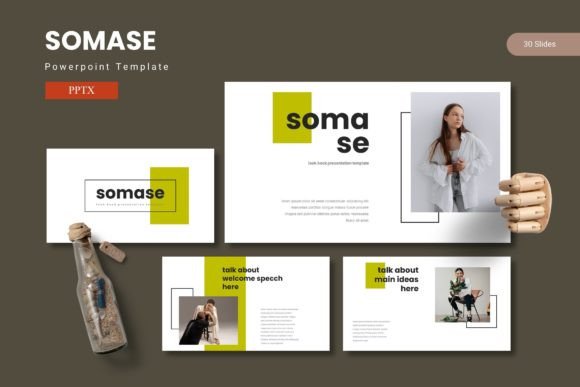
With 150 total slides spread across five premade color variations and 30 slides per color scheme, Somase - Powerpoint Template isn’t just a set of pretty backgrounds. It’s a toolkit. Every slide is built on master slides, so you can swap elements, resize graphics, and change colors without breaking the design. The handcrafted infographics and pixel-perfect illustrations mean you don’t need to be a seasoned designer to produce slides that look like they came from a creative agency. You just need the template.
Visual Characteristics That Work Hard
What makes Somase - Powerpoint Template stand out is its balance between structure and flexibility. The design leans modern without feeling trend-driven. It’s clean enough for corporate boardrooms but bold enough for creative pitches. The section break slides give your presentation breathing room, letting your audience absorb one idea before moving to the next. This kind of pacing is often overlooked, but it’s one of the most effective ways to maintain attention across a 20- or 30-slide deck.
The iconography and illustration style are consistent throughout. Every graphic is resizable and editable, which means you can scale them up for full-slide visuals or drop them into a corner as subtle accents. The picture placeholders use a drag-and-drop system, so you’re not wrestling with cropping tools or aspect ratio issues. You drop in your image, and the template handles the rest.
From a typography perspective, the template encourages solid font pairing choices. You’ll find natural opportunities to combine a clean sans serif font for body text with a more expressive serif font or script font for headings. This kind of contrast builds visual hierarchy quickly. Your audience instinctively knows where to look first, what supports the main point, and what to skim. That’s not accidental—it’s by design.
Where Somase Shines Across Projects
If you’re a brand strategist or marketer, you’ll appreciate how Somase - Powerpoint Template handles brand consistency. The five color variations mean you can lock in a palette that aligns with your client’s identity without starting from scratch. Swap the accent color, update the logo placement, and the deck feels custom. For small business owners who don’t have a dedicated design team, this shortcut is invaluable. You maintain a professional appearance without the overhead.
Freelance designers and creatives will find the gallery and portfolio slides especially useful. Whether you’re showcasing past work, presenting mood boards, or walking a client through a creative brief, the layout options give you room to let the visuals breathe. You’re not cramming images into boxes that don’t fit. The template respects white space, which makes every photo, mockup, or illustration feel intentional.
For publishers and content creators, Somase - Powerpoint Template works well in digital formats too. Export the deck as a PDF for lead magnets, use it for webinar slides, or repurpose sections for social media graphics. The consistent design language means your audience recognizes your content across platforms. That kind of brand recognition builds trust over time, and it starts with having a cohesive visual system.
In editorial design and packaging design contexts, you won’t typically use a PowerPoint template directly. But the thinking behind the slide layouts—the grids, the scale of imagery, the typographic proportion—can inform how you approach those projects. It’s a reminder that good structure translates across mediums.
How the Template Influences Readability and Engagement
Readability in a presentation isn’t just about font size. It’s about how the eye moves through information. Somase - Powerpoint Template uses a mix of data visualization, iconography, and text blocks to create natural paths across each slide. The handcrafted infographics are designed to simplify complex numbers and timelines. Instead of a bullet list of statistics, you get a visual that tells the story in one glance. That’s the kind of modern typography and layout thinking that keeps people leaning forward instead of checking their phones.
The premium font choices included in the template are meant to be both readable and distinctive. You can use a serif font for main headings to add a touch of authority, then pair it with a sans serif font for body copy to keep things approachable. If you want a more personal or energetic feel, a handwritten font or script font can work for pull quotes or section titles. The template gives you the room to experiment without losing consistency.
When it comes to brand perception, every slide reinforces professionalism. Clients and stakeholders don’t just see data—they see how you present it. A well-structured deck signals that you’re organized, that you value their time, and that you understand the details. Using Somase - Powerpoint Template communicates those qualities before you even speak a word.
Practical Guidance for Choosing and Using This Template
Before you dive in, take a few minutes to evaluate your project fit. Somase - Powerpoint Template is best suited for presentations where you need a balance of data and storytelling. If your deck is heavy on numbers and charts, the infographic layouts will serve you well. If you’re building a pitch around imagery and case studies, the gallery and portfolio slides give you the space you need.
When testing font pairings within the template, start with the five color variations. Each scheme comes with 30 slides, so you have room to experiment. Try using a display font for your most important headings to create a focal point, then rely on a commercial font with multiple weights for body text. Avoid mixing too many styles—stick to two, maybe three typefaces across the whole deck. That’s enough to build hierarchy without creating visual noise.
The master slides feature is your best friend. Any recurring element—like page numbers, section titles, or brand logos—should live on the master. This saves you from manually adjusting every slide and ensures nothing shifts position accidentally. It also makes bulk color changes effortless. Update the master once, and every slide follows.
If you’re using Somase - Powerpoint Template for a client project, double-check the licensing terms. The main files include five PPTX PowerPoint files, each with 30 slides and a color scheme. There’s a ReadMe file with font and photo information, so you’ll know exactly what’s included and what might need separate licensing. This matters when you’re delivering a final deck to a client who may want to edit it themselves later.
For web design and social media graphics, pull individual slide elements and repurpose them. A section break slide can become an Instagram story background. A data slide can be cropped into a LinkedIn post. Because everything is vector-based and resizable, you’re not locked into one format. The template becomes a design asset library you can draw from across multiple channels.
Final Observations from a Design Perspective
What I appreciate most about Somase - Powerpoint Template is that it doesn’t try to do everything. It focuses on being a solid, flexible presentation tool that respects your content. The 150 slides and five color options give you range, but the consistency keeps your deck from feeling like a patchwork of random ideas. That’s hard to achieve with free templates or starting from scratch.
If you’re a creative professional or entrepreneur who presents regularly, this template is worth having in your toolkit. It saves time, reduces design friction, and lets you focus on what actually matters—connecting with your audience. Whether you’re in a boardroom, a conference hall, or a Zoom call, the way you present shapes how your ideas are received. Somase - Powerpoint Template gives you the structure to do that well, without getting in the way.