Trimuca - Google Slide Template: A Versatile Presentation Solution for Professionals
Presentations remain one of the most effective ways to communicate ideas, pitch projects, or share data with an audience. But creating a polished deck from scratch takes time, especially when you need consistent visuals across many slides. Trimuca - Google Slide Template offers a structured yet flexible alternative. With 150 total slides across five premade color schemes, this template aims to reduce production time while maintaining a professional look. Whether you are preparing a client proposal, a marketing report, or an internal training deck, Trimuca provides a solid foundation without requiring advanced design skills.
What Trimuca - Google Slide Template Offers
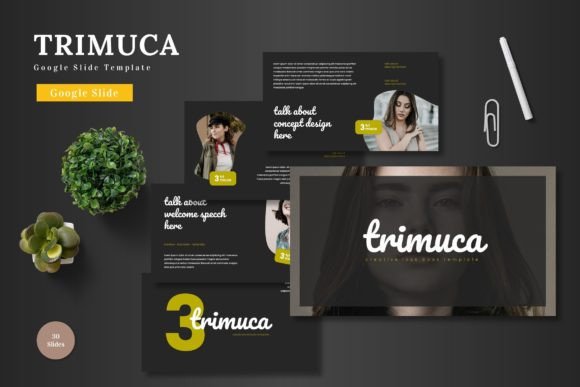
At its core, Trimuca is a comprehensive Google Slides template built around five distinct color variations, each containing 30 slides. That gives you 150 slides in total, all fully editable and resizable. The template includes section break slides, handcrafted infographics based on master slides, pixel-perfect illustrations, picture placeholders with drag-and-drop functionality, and dedicated gallery and portfolio slides. The main file package contains five PPTX items exported from Google Slides, five color schemes, a Readme First document, font files, and photo information for proper attribution.
What makes Trimuca worth discussing is its balance between depth and usability. Many templates offer a large slide count but sacrifice consistency or require heavy customization. Trimuca keeps each color variant self-contained with its own set of 30 slides, so you can switch between color schemes without losing layout integrity. The inclusion of master slides means global edits—like changing a font or repositioning a footer—apply across all slides in that variant, saving significant time during revisions.
Key Characteristics and Purpose
Trimuca serves two primary purposes: helping you build presentations faster and ensuring those presentations look cohesive. The template is designed for users who need to produce decks regularly but lack dedicated design support. Freelancers pitching to clients, marketers reporting campaign results, and educators preparing course material all fit this profile. The slide library covers common presentation needs: title slides, agenda slides, content layouts with text and image placeholders, data visualization pages with infographic elements, portfolio or gallery spreads, and closing slides.
The handcrafted infographic elements deserve specific mention. Rather than relying on generic charts, Trimuca uses illustrated graphics that you can edit directly. This allows you to represent statistics, workflows, or timelines in a visually engaging way without needing external tools. The pixel-perfect illustrations maintain clarity even when resized, which is important if you present on large screens or export to PDF.
Real-World Performance and Practical Value
In practice, Trimuca performs well for users who value structure over extreme flexibility. Because the template is built on master slides, the layouts are consistent by default. You rarely need to align elements manually or worry about spacing discrepancies between slides. This reliability makes it especially useful for team projects where multiple people contribute slides; the master slide framework reduces formatting drift.
The drag-and-drop picture placeholders simplify image integration. Instead of cropping and resizing each photo manually, you drop your image into the placeholder, and it scales automatically. This may seem like a minor convenience, but when you are working with dozens of images—for example, in a portfolio deck or a product catalog—the time savings add up significantly.
One area where Trimuca shines is in presentation speed. If you need a complete, professional-looking deck within a few hours, the template provides a clear starting point. Choose your color variant, select the slide types you need, drop in your content, and you have a functional presentation. The five color schemes also allow you to adapt the same deck for different brands or clients without rebuilding from scratch.
Quality, Usability, and Flexibility
The design quality of Trimuca is consistent and clean. The typography choices are readable at typical presentation sizes, and the color palettes are modern without being distracting. Pixel-perfect illustrations mean that fine details remain sharp, which matters if you project at high resolution or use the slides in printed handouts. The handcrafted infographics have a professional finish that avoids the overly generic look of default chart tools.
Usability is straightforward if you have basic familiarity with Google Slides. The included Readme First document explains the structure, how to use master slides, how to change colors, and how to insert images. Font files are provided so you can maintain the intended typography even if you edit on a different system. For users who prefer PowerPoint, the inclusion of five PPTX files gives you that option, though the template is originally designed for Google Slides and works best there.
Flexibility does have some limits. Because Trimuca uses master slides, significant layout experimentation is possible but may require more effort than using a fully modular template. If you want to completely restructure a slide type—for instance, turning a two-column layout into a three-column layout with different proportions—you will need to work within the master slide constraints or create custom layouts from scratch. For most users, however, the existing slide types cover a wide enough range of needs.
Who Benefits Most from Trimuca—and in What Situations
While Trimuca is broadly useful, certain users will get the most value from it. Freelancers and independent consultants often need to produce client-facing decks quickly without hiring a designer. The five color variants let them tailor presentations to different client brands while maintaining a consistent personal style. Marketers who produce weekly or monthly performance reports can use the infographic and data slides to present metrics in a more engaging way than plain charts.
Educators and trainers can use Trimuca for course materials that require both text-heavy slides and visual examples. The gallery and portfolio slides are particularly useful for showcasing student work or case studies. Small business owners who present at networking events or investor meetings will appreciate having a polished, ready-to-use template that does not require design expertise to operate.
Bloggers and content creators can also benefit. If you produce video presentations, webinars, or slide decks for social media, Trimuca gives you a consistent visual brand across multiple pieces of content. The ability to swap between color schemes means you can match seasonal or campaign-specific aesthetics without designing new layouts each time.
For teams, the master slide structure is a practical advantage. When multiple team members contribute slides, the template enforces uniform formatting by default. This reduces the need for last-minute alignment fixes and ensures the final deck looks like a single coherent presentation rather than a patchwork of individual efforts.
Practical Recommendations and Possible Limitations
Before committing to Trimuca, consider your specific workflow. If you frequently need highly customized slide layouts—for example, complex diagrams, custom data visualizations, or unique animation sequences—a more modular template or a custom build may serve you better. Trimuca provides a strong starting point but is not designed for extreme structural modification.
Also note that the template includes 30 slides per color variant, which is generous but still finite. If your typical presentation exceeds 30 slides, you may need to duplicate and adapt existing layouts or mix elements from different variants. This is manageable but requires some planning to maintain visual consistency.
For best results, start by reviewing all five color schemes in the included folder. Identify the palette that aligns most closely with your brand or the tone of your presentation. Then, use the master slides to apply any global font or color adjustments before building individual slides. This approach minimizes rework later. The drag-and-drop image placeholders work well, but ensure your images are high enough resolution to fill the placeholders without noticeable pixelation.
If you are new to Google Slides master slides, spend a few minutes with the Readme First document. Understanding how master slides work will unlock the template’s full potential and save you time in the long run. The font and photo information files are useful for keeping your assets organized and ensuring proper attribution if you use included imagery.
Long-Term Value and Versatility
Trimuca - Google Slide Template offers good long-term value for users who produce presentations regularly. The five color variants alone give you five distinct visual identities from a single purchase. Because the template is based on master slides, it remains usable even as your content needs evolve; you can build on the foundation it provides without outgrowing it quickly.
The handcrafted infographic elements and pixel-perfect illustrations have a longer shelf life than trend-driven design assets. They are clean and professional without being tied to a specific passing style. This means presentations you build today will still look appropriate a year or two from now, which matters if you reuse and update decks over time.
For professionals who value efficiency and consistency, Trimuca addresses a real need: reducing the friction of presentation creation without sacrificing quality. It does not promise to be the most avant-garde template available, but it reliably delivers what many users actually need—a versatile, well-organized toolkit for producing clear, professional presentations.
If your work involves communicating through slides on a regular basis, and you want a template that supports rather than constrains your process, Trimuca is worth evaluating. Its practical strengths in speed, consistency, and visual quality make it a resource that can serve you across many projects and contexts.