Mutora PowerPoint Template: A Versatile Tool for Confident Presentations
Creating a presentation that holds attention and communicates ideas clearly requires more than just good content. The visual framework you choose plays a major role in how your message is received. Mutora – Powerpoint Template is designed to address this need by offering a comprehensive set of slides that blend data visualization, graphics, and structured layouts. Instead of starting from a blank slate, you get a complete system that helps you build presentations with consistency and visual impact. This article takes a closer look at what Mutora offers, how it performs in practical use, and who stands to gain the most from it.
What Is Mutora – Powerpoint Template?
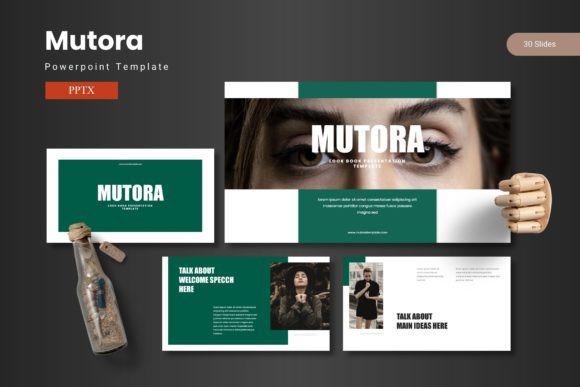
Mutora is a PowerPoint presentation template built around the idea of combining data, graphics, and content in a cohesive way. It is not a single file but a collection of five distinct template files, each with its own color scheme. In total, the package includes 150 slides, with 30 slides per template file. This structure means you are not limited to one look. You can choose the color variation that best fits your brand, audience, or the tone of your presentation.
The template covers a wide range of slide types: section breaks, infographics, gallery and portfolio slides, and placeholders for images and data. The emphasis is on helping you present ideas visually, without requiring advanced design skills. Whether you are preparing a business pitch, a marketing report, or an educational lecture, Mutora aims to provide a foundation that saves time and improves the overall quality of your slides.
Key Characteristics and Purpose
The main purpose of Mutora is to give you a ready-made structure that still allows room for customization. The template is built on master slides, meaning that changes made to the master layout automatically apply across all slides that use it. This is a practical feature when you need to maintain consistency across a long presentation. It also reduces the risk of formatting errors that can occur when manually adjusting each slide.
Another notable characteristic is the inclusion of handcrafted infographics. These are not generic charts or basic graphs. The infographics in Mutora are designed to be visually engaging while still communicating data clearly. They are editable, so you can adjust colors, text, and data points to match your specific information. This is especially useful if you regularly present statistics, progress reports, or comparisons.
The template also includes pixel-perfect illustrations. Every graphic element is designed to look sharp on screen and in print. Since all graphics are resizable and editable, you can scale them up or down without losing quality. This flexibility is important when you need to adapt a slide for different display sizes or print formats.
150 Total Slides Across 5 Premade Colors
Having 150 slides might sound like a lot, but the value lies in the variety. Each of the five template files comes with 30 slides, and the slides cover different purposes: title slides, content slides, section breaks, image galleries, portfolio layouts, and data-focused pages. You are not forced to use all 150 slides in one presentation. Instead, you pick the ones that fit your narrative. This approach saves time because you are not designing from scratch, and it also gives you options if you need to create multiple presentations for different clients or departments.
Section Break Slides
Section break slides are often overlooked, but they play an important role in guiding your audience through a presentation. Mutora includes dedicated section breaks that visually separate different parts of your talk. This helps maintain a logical flow and gives your audience a moment to transition between topics. In practice, this is useful for longer presentations or when you are covering multiple distinct subjects in one session.
Handcrafted Infographics Based on Master Slides
The infographics in Mutora are not auto-generated. They are designed with attention to detail, using consistent typography, color, and iconography. Because they are based on master slides, you can update the entire set of infographics by modifying the master. This is a time-saver if you need to change the color scheme or font family after you have already built your presentation. The infographics cover common data presentation needs: timelines, process flows, comparisons, percentages, and hierarchies.
Picture Placeholders and Drag-and-Drop
One of the most practical features is the picture placeholder system. Instead of manually cropping and positioning images, you simply drag and drop your photos into the designated areas. The template automatically adjusts them to fit the frame. This is especially useful when you are working with a large number of images, such as in a portfolio, gallery, or team introduction slide. It also reduces the chance of misaligned or distorted images.
Gallery and Portfolio Slides
For professionals who need to showcase work, Mutora includes dedicated gallery and portfolio slide layouts. These slides are designed to display images in a clean, organized way. You can use them to highlight projects, products, or team members. The layouts are flexible enough to work with both horizontal and vertical images, and the placeholder system ensures that your images look consistent across slides.
Quality, Reliability, and Consistency
When evaluating a PowerPoint template, quality is about more than just how it looks. It includes how well the template holds up when you edit it, how easy it is to navigate, and whether the design remains consistent after changes. Mutora performs well in these areas. The master slide setup gives you a reliable foundation. If you decide to change the color scheme or font, you can do it from the master and all slides update automatically. This reduces the manual work and helps maintain a professional look throughout.
The graphics and illustrations are designed to be pixel-perfect, which means they look crisp on high-resolution screens and in printed materials. This is particularly important if you present on large displays or share printed handouts. The resizable nature of the graphics also adds to the reliability. You do not have to worry about losing resolution when you scale an element up.
Consistency across the five color variations is another strength. Whether you choose the blue, green, red, purple, or dark theme, the layout structure and typography remain the same. This allows you to switch between color schemes without redesigning your content. It also means that if your brand colors change, you can adapt the template without starting over.
Usability and Flexibility in Real-World Use
Usability is one of the strongest points of Mutora. The template is designed to be accessible for users who are comfortable with PowerPoint but may not be design experts. The drag-and-drop picture placeholders, the logical slide categories, and the master slide system make it easy to assemble a presentation in a short amount of time.
In a real-world scenario, imagine you need to prepare a quarterly business review for your team. You have data to present, images of recent projects, and a need to clearly separate each department's results. With Mutora, you can start by selecting a color scheme that aligns with your company's branding. Then you pull in the section break slides to separate each department. Use the infographic slides for KPIs and performance metrics, and the portfolio slides to showcase project highlights. The picture placeholders let you quickly add team photos or product images. The whole process becomes more about arranging content than designing from scratch.
For freelancers and consultants who create presentations for different clients, Mutora offers flexibility. You can use one template file for a formal client report and another for a creative pitch. The variety of slide types means you are not locked into a single layout. You can mix and match slides from different categories to create a custom flow for each project.
Who Benefits Most from Mutora – Powerpoint Template?
Mutora is suited for a wide range of users, but some will find it particularly valuable:
- Marketers and entrepreneurs who regularly present campaign results, market analysis, or business plans. The infographics and data slides help present numbers in a way that is easy to understand.
- Educators and trainers who need to create structured lectures or workshop materials. The section breaks and consistent layouts help students follow along.
- Creators and freelancers who build portfolios or pitch decks for clients. The gallery and portfolio slides are specifically designed to showcase visual work.
- Small business owners who may not have a dedicated design team but still need professional-looking slides for investor meetings or team updates.
- Publishers and bloggers who create slide decks for webinars, online courses, or speaking engagements. The clean layouts work well in both live and recorded settings.
Practical Considerations and Possible Limitations
While Mutora is a robust template, it is worth noting a few practical considerations. First, the template is designed for PowerPoint, so users of other presentation software like Google Slides or Keynote would need to check compatibility or be prepared to convert files. The template is delivered in 5 PPTX files, which is the standard PowerPoint format. If you work primarily in Google Slides, you may need to upload and adjust the formatting after conversion.
Second, the template includes 150 slides, which is a lot of content to browse through. It can take some time to familiarize yourself with all the layouts and decide which ones work best for your specific presentation. However, this is a one-time investment. Once you know the structure, future presentations become faster to build.
Third, the template requires you to have basic knowledge of PowerPoint, especially the master slide view. If you are completely new to PowerPoint, you may need to spend a little time learning how to edit master slides and apply the template correctly. The included Readme First document provides guidance, but some users may benefit from a quick tutorial.
Finally, the template is designed to be editable, but over-customizing can sometimes break the layout consistency. It is best to stick to the intended structure for most slides and only make deeper edits when necessary.
Long-Term Value
From a long-term perspective, Mutora offers good value because you are getting five templates in one package. Instead of buying a single look, you have five color variations that can be used across different projects, clients, or seasons. The master slide system also means that as your design preferences evolve, you can update the template to match new branding or style guidelines.
The infographics and illustrations are designed to be timeless rather than trend-driven. This reduces the risk of your presentations looking dated after a year or two. The focus on clean, professional design means that the template can serve you well across multiple years and presentations.
Final Thoughts
Mutora – Powerpoint Template is a well-structured and practical tool for anyone who wants to create professional presentations without spending hours on design. Its 150 slides, five color variations, handcrafted infographics, and easy-to-use placeholders make it a solid choice for a wide range of professional contexts. While it is best suited for PowerPoint users, the quality of the design and the flexibility of the layouts make it a resource worth considering if you frequently build presentations that need to communicate data and ideas clearly. Whether you are a marketer, entrepreneur, educator, or freelancer, Mutora provides a reliable foundation that lets you focus on your message while still delivering a visually compelling experience.