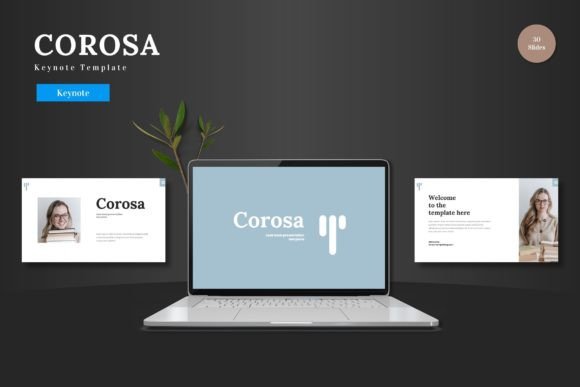
Corosa Keynote Template for Polished Presentations
Putting together a presentation that actually holds attention takes more than just good content. The visual structure, the flow between slides, and the overall polish all matter, especially when you are pitching an idea, walking a client through a proposal, or training a team. A solid template gives you that structure without forcing you to design every element from scratch. Corosa - Keynote Template is one of those options that aims to balance flexibility with a clean, professional look, and it works across a surprising range of use cases.
What Corosa - Keynote Template Offers
At its core, this is a multipurpose Keynote template built around scalability and ease of use. It comes with 150 total slides organized into five distinct color variations, so you get 30 slides per scheme. That alone saves hours of manual formatting. The slides are constructed on Master Slides, which means any change you make to a master slide automatically updates across all related slides. This is a practical feature when you need to maintain brand consistency or tweak a color palette late in the editing process.
All graphical elements in Corosa are vector-based, meaning they are resizable and editable without losing quality. You can scale icons, illustrations, or infographics up or down, and they remain crisp. The template also includes picture placeholders with a drag-and-drop workflow, so inserting your own images is straightforward. You do not need external software like Photoshop or Illustrator to swap visuals. Everything happens within Keynote itself.
Editable Graphics and Infographics
The handcrafted infographics are worth noting. These are not generic charts slapped together. They are designed to communicate data in a visually clear way, which matters whether you are presenting quarterly results or comparing product features. Because they are fully editable, you can adjust colors, resize elements, or rearrange layouts to match your narrative. This kind of flexibility is especially useful for marketers and business owners who need to repurpose the same slide deck for different audiences.
Section Breaks and Animated Slides
Section break slides are included, which help structure longer presentations into digestible segments. If you have ever sat through a dense deck where every slide looks the same, you know how easy it is to zone out. A well-placed section break resets attention and signals a shift in topic. Corosa also includes animated slide transitions. These are subtle enough to add motion without distracting from the content. When presenting virtually, a little movement can keep viewers engaged across screens.
Practical Applications Across Different Roles
Because the template is clean and scalable, it works for a variety of contexts. Here are a few realistic scenarios where it fits naturally.
Business Pitches and Investor Decks
If you are presenting to potential investors or partners, first impressions matter. A polished deck signals that you pay attention to details. Corosa's clean layouts and consistent color schemes help your data and value proposition stand out rather than getting lost in cluttered design. The built-in infographics are useful for illustrating market size, growth projections, or user adoption metrics. And because you have five color variations, you can choose one that aligns with your brand or industry norms.
E-Commerce and Product Launches
For e-commerce professionals launching a new product line, the template's portfolio and gallery slides come in handy. You can showcase product images with placeholders that maintain consistent sizing and alignment. The ability to drag and drop images speeds up the workflow, especially if you are iterating through multiple product shots. The section break slides also let you separate product categories or phases of a launch timeline cleanly.
Internal Training and Team Updates
Educators, team leads, and freelancers working with collaborators will appreciate the straightforward navigation. Training decks often require repeating certain slide types with minor variations. Because Corosa is built on Master Slides, you can create a consistent look across all training modules without rebuilding each slide. This is also helpful for bloggers or content creators who produce educational materials or online course supplements.
Creative Portfolios and Personal Branding
Freelancers and creative professionals often need a portfolio deck for client pitches. The gallery layouts and clean typography give your work room to breathe. You are not fighting against heavy backgrounds or flashy elements that distract from your actual output. The template's scalability also means you can present on a laptop screen, a tablet, or a large monitor, and the proportions will hold up.
Efficiency and Workflow Benefits
One of the biggest time sinks in presentation creation is formatting. You adjust one slide, and then you have to adjust ten more to match. Corosa eliminates much of that repetition. Because all elements are editable from Keynote shapes, you stay within one application throughout the entire process. There is no need to jump into other tools for graphic adjustments or color corrections.
The five included Key files correspond to the five color schemes. If you need to switch from a corporate blue to a warmer palette for a different audience, you open the relevant file instead of manually changing every slide. This is practical for agencies or consultants who produce multiple decks per week.
Drag-and-Drop Image Placement
Picture placeholders are a small feature that makes a big difference. You drag your image into the designated area, and it snaps into the correct dimensions. No cropping guesswork. This is especially useful when you are working with a team where not everyone is design-savvy. The template reduces the margin for error in visual consistency.
Resizable and Editable Elements
The vector graphics mean you can resize any icon or illustration without pixelation. If you need a larger icon to fill a slide or a smaller one to fit into a corner, it scales cleanly. This is a practical advantage over raster images that degrade when stretched. It also means you can combine elements from different slides to create custom layouts without losing quality.
Considerations When Using the Template
No template is a magic bullet, and Corosa is no exception. Here are a few things to keep in mind to get the most out of it.
- Fonts and licensing: The template comes with a readme file and font information. Make sure you have the necessary fonts installed or licensed before you start editing. Some fonts may need to be downloaded separately.
- Photo credits: The included placeholder images are for demonstration purposes. You will need to replace them with your own images or properly licensed stock photos.
- Animation pacing: The animated slides are engaging, but test them before a live presentation. Animations that work well on your screen might behave differently on older hardware or during screen sharing. It is worth running through the deck once in presentation mode to check timing.
- Color consistency: The five color schemes are premade, but if your brand uses a specific hex code, you can edit the master slides to match. This takes a few minutes upfront but pays off in brand alignment.
Why Presentation Quality Matters
In professional, educational, and creative settings, the quality of your presentation reflects the quality of your work. A well-structured deck with consistent visuals and clear data makes your message easier to absorb. It shows respect for your audience's time. Corosa helps you achieve that without requiring deep design skills. The template handles the visual heavy lifting so you can focus on the substance of your content.
For entrepreneurs and business owners who present regularly, the time saved by using a solid template adds up quickly. You are not reinventing the layout for every meeting. You open a file, swap in your content, and you are ready to go. The same applies to marketers running weekly updates or product demos. Consistency across presentations also reinforces brand identity. When your slides look professional every time, clients and colleagues notice.
Final Thoughts on Corosa - Keynote Template
Corosa - Keynote Template is a practical tool for anyone who needs to create presentations regularly. Its 150 slides, five color variations, editable vector graphics, and drag-and-drop image placeholders cover a wide range of needs. Whether you are pitching to investors, training a team, launching a product, or building a portfolio, the template gives you a clean foundation to work from. The key is to treat it as a starting point, customize it to fit your voice, and let your content lead the way.
If you value efficiency, visual consistency, and the ability to edit everything inside Keynote without external software, this template is worth a look. It is scalable enough for large decks and flexible enough for quick, one-off presentations. And because it is built with Master Slides, any adjustments you make propagate intelligently, saving you from tedious manual updates.
Ultimately, the goal of any presentation is to communicate clearly. A template that gets out of your way and supports your message is a good investment. Corosa does exactly that, and it does so with a clean, colorful, and professional aesthetic that works across industries and contexts.