Nomano Keynote Template: A Practical Tool for Polished Presentations
Putting together a presentation that actually holds attention takes more than just good slides. It requires a consistent visual language, thoughtful pacing, and design choices that support your message rather than distract from it. The Nomano - Keynote Template offers a framework that handles the visual heavy lifting, letting you focus on what you want to say. This article walks through what it includes, how it works in real settings, and what to consider before using it.
What the Nomano - Keynote Template Actually Delivers
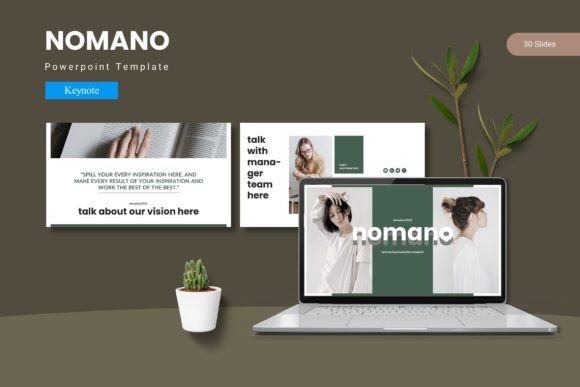
At its core, this template provides 150 total slides spread across five pre-made color schemes, with 30 slides per variation. That means you get a complete set of layouts for each color option, not just a handful of mismatched slides. The inclusion of section break slides, infographics built on master slides, and pixel-perfect illustrations gives you a consistent toolkit from start to finish.
All graphics are resizable and editable, and picture placeholders use a simple drag-and-drop system. You also get gallery and portfolio slide layouts, which are useful if your presentation needs to showcase work, products, or visual examples. The main file includes five Keynote items (one for each color scheme), a folder containing the Keynote files, a Read Me First document, and font and photo information.
Why Master Slide-Based Infographics Matter
One standout feature is that the infographics are based on master slides. This is more than a technical detail. When an infographic is built on a master slide, any changes you make to the master automatically update every instance throughout the presentation. If you need to adjust a color, reposition an element, or tweak a label, you do not have to go slide by slide. It saves time and prevents the kind of inconsistencies that make a presentation look rushed.
Five Color Variations, Not Just Five Color Swatches
The template includes five separate color schemes, each with its own complete set of 30 slides. This is different from providing a single theme with a few color swap options. You can pick the scheme that fits your brand, your client’s guidelines, or the tone of your event. If you present regularly to different audiences, having five distinct looks means you can vary your visual approach without starting from scratch each time.
Practical Applications Across Different Contexts
A template like this one is only useful if it adapts to how you actually work and present. Here are several scenarios where the Nomano - Keynote Template can be applied directly.
Business Pitches and Client Proposals
When you are pitching a project or presenting a proposal, credibility matters. Clean, consistent slides with professional infographics help convey that you have thought things through. You can use the section break slides to separate your problem statement, solution, methodology, timeline, and pricing. The portfolio slides are useful for showcasing past work or case studies without having to design custom layouts for each example.
Internal Team Presentations and Training
For weekly updates, quarterly reviews, or internal training sessions, the template helps maintain a consistent company look without requiring a design team. You can customize the fonts and colors to match your brand guidelines and reuse the same structure for recurring meetings. The master slide infographics are especially helpful for visualizing metrics, timelines, or process flows that get updated from one meeting to the next.
Educational Lectures and Workshops
Educators and trainers often need to present complex information in an accessible way. The gallery and portfolio slides can be adapted to show images, diagrams, or student work. The section break slides give natural pause points where you can transition between topics or facilitate discussion. Since all graphics are resizable, you can enlarge key diagrams or shrink supporting visuals depending on your lecture flow.
Creative Portfolios and Freelancer Showcases
Freelancers and creative professionals need presentations that reflect their visual taste. The pixel-perfect illustrations and editable graphics allow you to align the template with your personal style. You can swap in your own images using the drag-and-drop placeholders, and the five color schemes give you options to match your brand or the mood of a specific project. Whether you are presenting at a conference or sending a PDF portfolio to a potential client, the template provides a polished backdrop.
Marketing and Product Launch Decks
Launching a product or campaign often requires a deck that moves quickly through features, benefits, market data, and calls to action. The infographic layouts are useful for presenting statistics or comparison charts in a visually engaging way. The consistent slide structure means your audience can focus on the product details rather than being distracted by inconsistent design choices.
Usability and Efficiency Benefits
Ease of use matters when you are under a deadline. The drag-and-drop picture placeholders remove the need to manually position and crop images. You simply drop your photo into the placeholder, and it fits the layout. This alone can save several minutes per slide when you are working with a large deck.
Because all illustrations are vector-based and resizable, you can scale elements up or down without losing quality. If you need a larger icon or a smaller chart, you can adjust it directly in Keynote. This level of control is especially useful when you are tailoring a presentation to a specific screen size or projection setup.
The Read Me First document and font information are included for a reason. They help you avoid common pitfalls like missing fonts or confusion about file organization. Taking a few minutes to read those notes before you start editing can save you from having to troubleshoot later.
Branding and Communication Advantages
A cohesive visual presentation reinforces your message. When every slide follows the same design logic, your audience can focus on the content without being pulled in different visual directions. The Nomano - Keynote Template supports this by providing a unified set of layouts, colors, and illustration styles.
If you are presenting on behalf of a company, you can customize the fonts and colors to align with brand guidelines. If you are an independent professional, you can use the template to establish a consistent visual identity across multiple presentations. Over time, that consistency helps your audience recognize your work and associate it with a certain level of quality.
Practical Considerations Before You Start
Before you dive into editing, here are a few things worth keeping in mind.
- Fonts and photos: The template includes information about the fonts and photos used. If you do not have those fonts installed, your text may default to a system font, which could break the intended design. Check the provided font details and install what you need before you start customizing.
- File organization: The main file contains separate items for each color scheme. Keep them organized so you can quickly access the version you need. If you plan to use multiple color schemes across different projects, label your files clearly.
- Master slide edits: Because the infographics are built on master slides, any change you make to the master will affect all slides using that layout. This is powerful, but it also means you should be deliberate about edits. If you want a unique infographic for a single slide, consider duplicating the layout first.
- Drag-and-drop limits: While the placeholders simplify image placement, your images should still be high resolution and appropriately cropped. A low-quality image will stand out against polished graphics.
- Audience and medium: Consider where you will present. A deck designed for a large conference screen may look different when exported as a PDF for email. Review your slides in the actual format you plan to use.
Who Will Get the Most Out of This Template
This template is best suited for people who present regularly and want a reliable setup without reinventing the design wheel each time. Entrepreneurs, marketers, educators, freelancers, and business professionals are the obvious candidates, but it also works for hobbyists who give talks at meetups or community events. If you value visual consistency and need a range of layouts for different types of content, the Nomano - Keynote Template provides a solid foundation.
On the other hand, if you prefer to design every slide from scratch or need highly unconventional layouts that break standard grid structures, a template like this may feel restrictive. That is not a flaw in the template itself, but a consideration of whether its structured approach fits your workflow.
Final Thoughts on Using the Nomano - Keynote Template
A presentation template is a tool, not a shortcut. The Nomano - Keynote Template gives you a coherent set of slides, multiple color options, and editable graphics that can save you time and improve visual consistency. The real value comes from how you use it. Customize the layouts to fit your content, choose a color scheme that supports your message, and take advantage of the master slide structure to keep everything consistent.
Whether you are preparing a client pitch, an internal update, an educational workshop, or a creative portfolio, having a reliable template lets you focus on the substance of your presentation. And in most settings, that is exactly where your attention should be.