Emalosa Powerpoint Template: Ready to Use for Any Project
Putting together a presentation that actually looks polished and professional takes more time than most people expect. You might have great content, strong data, and a clear message, but if the slides feel cluttered, dated, or inconsistent, your audience checks out before you finish your second sentence. That is where a well-structured template like Emalosa - Powerpoint Template makes a real difference. It handles the visual heavy lifting so you can focus on your story.
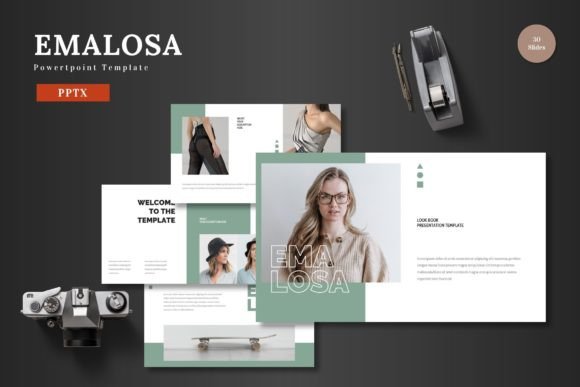
This template is built around flexibility. With 150 total slides spread across five premade color variations, you are not locked into a single look. Each color scheme includes 30 slides, giving you a complete deck whether you are pitching a startup, presenting a quarterly report, or building a portfolio for a creative client. The slide layouts cover section breaks, infographics, gallery pages, and portfolio showcases, so you rarely need to build something from scratch.
What Makes Emalosa Stand Out Visually
Emalosa carries a clean, modern aesthetic that works well across industries. The layouts use generous white space, balanced typography hierarchies, and subtle geometric accents. It does not lean too heavily into trends that will feel dated next year. Instead, it sticks to a timeless structure with enough color flexibility to match your brand. The five color schemes included are not just palette swaps either. Each one adjusts accent colors, background tones, and chart fills to create a distinct mood.
The template includes pixel-perfect illustrations and infographic elements that are fully resizable and editable. If you need to tweak an icon, resize a diagram, or recolor a chart, you can do it directly inside Powerpoint without touching Illustrator or Photoshop. Everything relies on master slides, which means changing one slide updates all related layouts automatically. That consistency saves time and prevents the messy formatting issues that happen when you manually adjust each slide.
Who Benefits from a Template Like This
If you are an entrepreneur preparing a pitch deck for investors, Emalosa gives you a structured narrative flow. The section break slides help separate problem, solution, market size, and financials clearly. Investors appreciate clean visuals that do not distract from the numbers. For marketers presenting campaign results or product roadmaps, the infographic slides turn raw data into digestible visuals. The gallery and portfolio slides work well for creative professionals showcasing work, whether you are a photographer, designer, or agency owner.
Small business owners and bloggers also get real value here. If you are constantly putting together presentations for webinars, client onboarding, or partner meetings, having a consistent brand look across every deck builds trust. The template includes drag-and-drop picture placeholders, so swapping your own images takes seconds. No wrestling with alignment or cropping.
How Emalosa Improves Readability and Visual Hierarchy
Good presentation design is not just about looking nice. It is about guiding your audience through information in a logical order. Emalosa uses size, weight, and color contrast to establish clear visual hierarchy. Headlines sit prominently at the top, supporting text drops into secondary placement, and callout boxes or icons draw attention to key takeaways. The font choices are readable at distance, which matters if you are presenting on a large screen in a conference room.
Because the template includes five color variations, you can choose a palette that offers enough contrast between background, text, and accent elements. High contrast improves readability, especially for audiences with visual impairments or those viewing on projectors with lower brightness. The clean backgrounds also mean your content stays legible even when shared as a PDF or displayed on a mobile screen.
Practical Tips for Getting the Most Out of Emalosa
Start by reviewing all five color schemes before you begin building your deck. Pick the one that aligns closest with your existing brand colors or the tone you want to set. A darker scheme with bold accents works for serious financial presentations, while lighter palettes with softer tones suit lifestyle brands or creative portfolios. You can always tweak individual colors later, but starting with a cohesive palette saves time.
Use the master slides feature to your advantage. If you need to add a logo to every slide, edit it once on the master slide rather than pasting it 30 times. The same goes for footer text, page numbers, or background elements. Keeping everything linked to master slides also makes it easier to hand the file off to a colleague without breaking formatting.
When adding images, stick to high-resolution photos that match the slide proportions. The picture placeholders use specific aspect ratios, and stretching a low-res image to fit leads to pixelation that undermines the professional look. Take a few extra minutes to crop and resize images before dropping them in.
Font Pairing and Typography Considerations
Emalosa works best with clean sans-serif fonts for body text. The template structure supports strong display fonts for headlines without overwhelming the slide. If your brand uses a custom typeface, you can swap the included fonts easily since everything is editable. For presentations intended for print or PDF distribution, consider a serif font for headings paired with a sans-serif body. That combination adds contrast and feels more editorial.
Keep your font count to two, maybe three max across the entire deck. Too many typefaces create visual noise and make your slides feel unfocused. Emalosa is designed to look cohesive with minimal font variation, so trust the built-in hierarchy and only introduce a custom font if it directly supports your brand identity.
Licensing and File Structure
The main file includes five PPTX files, one for each color scheme, each containing 30 slides. You also get a folder with a readme file and information about fonts and photo credits. Make sure you review the font license for any typefaces used in the template. Some fonts are free for commercial use, while others may require a separate purchase. The readme file spells out what is included and what you need to source yourself.
Photography used in the demo slides is not included with the template. You will need to replace placeholder images with your own photos or licensed stock imagery. Plan for that when budgeting time for your project. The template gives you a professional framework, but the final quality depends on the assets you bring to it.
Where Emalosa Fits in Your Workflow
If you frequently build presentations for clients or internal stakeholders, having a reliable template library saves hours of repetitive work. Emalosa covers enough variety that you can use it for different types of decks without your audience feeling like they are seeing the same slides over and over. The five color schemes alone give you five distinct visual identities from a single template.
Freelancers and consultants will appreciate the polished look it brings to client deliverables. A well-designed deck signals that you pay attention to detail, which reflects positively on your work even before you start talking. For in-house teams, the template helps maintain brand consistency across departments without everyone building their own version of a presentation from scratch.
Ultimately, Emalosa gives you a professional starting point. You still need strong content, clear messaging, and compelling visuals. But the template removes the friction of formatting, alignment, and layout decisions so you can spend your energy on what actually matters: communicating your ideas effectively.