Mingana Keynote Template: A Complete Guide to Creating Professional Presentations
Presentations are a cornerstone of modern communication, whether you are pitching a business idea, teaching a class, reporting quarterly results, or sharing a creative portfolio. Yet crafting a presentation that is both visually compelling and structurally clear often feels like a daunting task. You might spend hours adjusting layout inconsistencies, hunting for the right fonts, or reworking color schemes that just do not click. The Mingana Keynote Template is designed to remove these friction points and help you produce polished, cohesive slide decks with far less effort. This article explores how the template works, who benefits most from it, and how you can use it to elevate your next presentation.
What Is the Mingana Keynote Template?
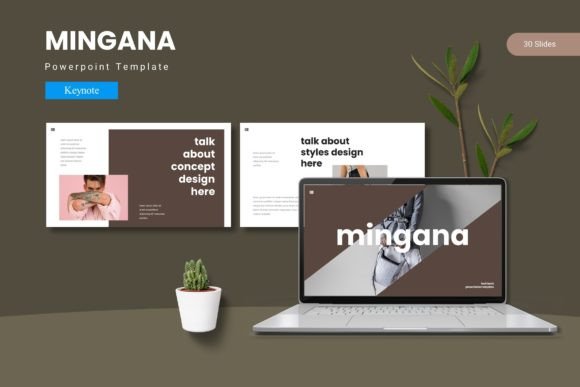
The Mingana Keynote Template is a comprehensive presentation framework built exclusively for Apple Keynote. It provides a complete set of pre-designed slides, layout variations, and visual assets that you can customize to fit almost any topic or brand. With 150 total slides spread across five premade color variations, the template gives you consistent typography, structured infographics, and placeholder image slots that make dragging and dropping your own content simple. Each color scheme includes 30 slides, plus section break slides that help you divide your presentation into clear, memorable chapters. Whether you are a freelancer, a corporate professional, an educator, or a creative, the Mingana Keynote Template aims to reduce the time you spend on design so you can focus on your message.
The Real Challenge: Making Presentations Work for Your Audience
Most presentation struggles are not about lacking ideas. They are about structure and visual clarity. You have the data, the story, and the passion, but when your slides feel cluttered, mismatched, or hard to follow, your audience disengages. Common pain points include:
- Inconsistent design – mixing fonts, colors, and image styles that look unprofessional.
- Time wasted on formatting – aligning text boxes, resizing images, and fixing broken layouts.
- Difficulty creating a narrative flow – slides that feel disconnected rather than part of a unified story.
- Lack of visual variety – repeating the same layout slide after slide, which leads to monotony.
- Limited flexibility for different contexts – what works for a boardroom may not suit a creative pitch or a classroom.
The Mingana Keynote Template addresses each of these issues directly. It provides a structured yet flexible foundation that helps you maintain consistency while adapting to your specific presentation goals.
Consistency Without the Grunt Work
One of the biggest advantages of the Mingana Keynote Template is its use of Master Slides. These are the underlying slide layouts that control fonts, colors, and placement across your entire deck. When you edit a Master Slide, every slide based on that layout updates automatically. This means you can change your heading font or adjust the position of a text box once, and the change ripples through all relevant slides. For anyone who has manually adjusted dozens of slides only to find a misalignment on the final review, this feature alone saves substantial time and frustration.
Built-in Visual Variety
With 150 slides spread across five color schemes, the Mingana Keynote Template offers far more variety than a typical presentation template. You are not limited to a single look or a handful of slide types. Instead, you have access to gallery and portfolio slides, infographic layouts, section break slides, and custom graphic elements. This variety keeps your audience visually engaged from start to finish, which is especially important for longer presentations where attention spans can drift.
Effortless Customization for Your Brand
Whether you need to match your company colors or prefer a specific mood, the five premade color schemes give you a solid starting point. Because all graphic elements are resizable and editable, you can tweak the look further without needing advanced design skills. The template also includes a dedicated folder with font information and photo credits, so you know exactly which typefaces and image styles work best. If you have a brand kit, you can adapt the template accordingly. If you do not, the ready-to-use schemes already look polished on their own.
Practical Applications and Real-World Outcomes
The Mingana Keynote Template is not a one-size-fits-all solution, but it comes close because of its breadth. Here are several scenarios where the template delivers tangible results.
Business Pitches and Sales Decks
When you are pitching to investors or clients, first impressions matter. A clean, professional slide deck signals that you are organized and credible. The Mingana Keynote Template gives you slides specifically designed for showcasing data, presenting timelines, and highlighting key benefits. The infographic layouts allow you to turn complex numbers into easy-to-understand visuals, which helps your audience grasp your value proposition quickly. By using the section break slides between major topics, you create natural pauses that help your listeners follow your narrative arc.
Educational and Training Presentations
Educators and trainers often need to present information in a structured, digestible way. The Mingana Keynote Template supports this with layouts that balance text and imagery. You can use gallery slides to show examples, portfolio slides to display student work or case studies, and infographic slides to explain processes or hierarchies. The consistency across slides means learners can focus on content rather than being distracted by shifting design elements.
Creative Portfolios and Design Showcases
For photographers, designers, artists, and other creatives, the portfolio and gallery slides within the Mingana Keynote Template are a standout feature. These layouts are built around large, high-quality images with clean margins and minimal text. You can drag and drop your work directly into the picture placeholders, and the template handles the cropping and sizing automatically. This ensures your visuals take center stage while the design remains unobtrusive and professional.
Internal Reports and Team Updates
Company meetings and team updates often rely on data-heavy slides. The Mingana Keynote Template includes handcrafted infographic elements that are perfect for presenting key metrics, project milestones, or department summaries. The five color variations also make it easy to differentiate between recurring reports without starting from scratch each time. For example, you could use one color scheme for quarterly reviews and another for monthly check-ins, giving each report its own identity while maintaining overall consistency.
How Different Users Can Approach the Mingana Keynote Template
Not every user will interact with the template in the same way. Your approach depends on your experience level, your presentation goals, and the amount of time you want to invest in customization.
For Beginners: Start With What Is Ready
If you are new to Keynote or feel overwhelmed by design choices, the Mingana Keynote Template is designed to be plug-and-play. Choose one of the five color schemes, replace the placeholder text with your own, and drop your images into the designated slots. You do not need to adjust fonts, alignment, or color palettes. The template already handles those details. This approach lets you create a professional presentation in a fraction of the time it would take to build one from scratch.
For Intermediate Users: Tweak to Match Your Brand
If you have some experience with Keynote, you can take advantage of the Master Slides to customize the template further. Adjust the color scheme to match your exact brand colors, swap fonts to align with your style guide, or modify the infographics to display your specific data. Because the template is based on Master Slides, these changes apply globally, so you maintain consistency across all slides without extra effort.
For Advanced Users: Build Complex Narratives
Power users can treat the Mingana Keynote Template as a modular building kit. With 150 slides and multiple color variations, you can mix and match layouts from different color schemes to create a unique presentation tailored to a specific audience. You can also use the section break slides to structure long presentations into clear acts or chapters. This is particularly useful for workshops, multi-day training sessions, or conference talks where you need to reset audience attention at regular intervals.
Useful Considerations When Using the Mingana Keynote Template
To get the most out of the Mingana Keynote Template, keep these practical tips in mind.
- Plan your content first. Before you open the template, outline your key messages and decide which visuals you will use. This helps you select the most appropriate slide layouts and avoid cluttering your deck.
- Use the section break slides intentionally. These slides are designed to signal a shift in topic. Place them before major new sections to give your audience a mental reset.
- Optimize your images. The picture placeholders work best with high-resolution images. Compress your photos beforehand to keep your Keynote file size manageable without sacrificing quality.
- Stick to one color scheme per presentation. While the template offers five variations, using more than one in a single deck can confuse your visual narrative. Pick the scheme that best fits your topic and brand, and use it consistently.
- Take advantage of the included documentation. The Read Me First file contains useful information about fonts and photo credits. Reviewing it ensures you stay compliant with licensing requirements and understand how the template is structured.
Why the Mingana Keynote Template Stands Out
There are many presentation templates available, but the Mingana Keynote Template distinguishes itself through both quantity and quality. The 150 slides cover a broad spectrum of use cases, from data-driven reports to image-heavy portfolios. The handcrafted infographics are not generic clip art; they are designed to be resized and recolored while remaining visually coherent. The five color variations give you flexibility without overwhelming you with too many choices. And because everything is based on Master Slides, the template remains easy to edit no matter how much you customize it.
For anyone who regularly creates presentations in Keynote, having a resource like the Mingana Keynote Template means you can maintain a high standard of design with far less effort. Instead of reinventing the layout for every new project, you start with a proven structure and focus your energy on content, storytelling, and audience engagement.
Getting Started with the Mingana Keynote Template
To begin, open the main Keynote file included in the folder. Browse the 30 slides for your chosen color scheme to understand the available layouts. Replace the placeholder text with your own copy, and use the drag-and-drop picture placeholders to insert your images. If you want to change the color scheme, duplicate your presentation and apply a different set of Master Slides from the template bundle. This way, you can compare looks without losing your content.
Remember that the template is a tool to support your message, not a replacement for it. The most effective presentations combine strong design with clear thinking. The Mingana Keynote Template handles the design part so you can invest your energy where it matters most: connecting with your audience and delivering your ideas with confidence.
Whether you are preparing a boardroom pitch, a classroom lecture, or a portfolio review, the Mingana Keynote Template gives you the structure, variety, and polish you need to leave a lasting impression. Start with the color scheme that resonates with your topic, customize as needed, and let the template do the heavy lifting.