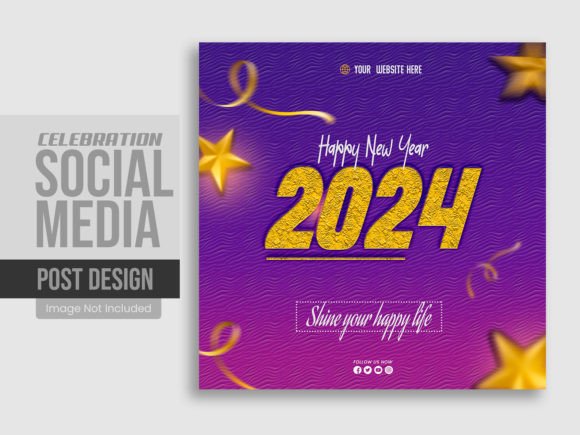
New Year Social Media Post or Square Banner Template
New Year brings with it a fresh wave of energy, new goals, and the need to connect with audiences in meaningful ways. Whether you are posting a simple greeting, announcing a sale, or sharing your vision for the year ahead, the visual format matters. A New Year social media post or square banner serves as a ready foundation for creating polished, on-brand visuals without starting from a blank canvas. This article explores what this type of template offers, why different people might care about it, and how to decide if it fits your own workflow or creative needs.
The template described here is a layered Photoshop PSD file designed for square layouts, typically 1080x1080 pixels at 300 DPI. It includes editable elements, a help guide, and uses free fonts. But beyond the technical specifications, the real value lies in how it reduces friction between an idea and a finished post.
What a New Year Social Media Post or Square Banner Template Actually Does
At its core, this template is a structured design file that separates visual components into individual layers. Backgrounds, text, decorative elements, and images each live on their own layer, which means you can move, hide, or modify them independently. The result is a flexible starting point that can be adapted for different messages, brand colors, or personal styles.
The 300 DPI resolution ensures print-ready quality if you ever need physical banners, while the 1080x1080 pixel size aligns with standard social media dimensions for platforms like Instagram, Facebook, and LinkedIn. The inclusion of a help guide and free fonts means that even someone with limited Photoshop experience can open the file and begin customizing right away.
Why Different Audiences Might Care About This Template
The same square banner can serve very different purposes depending on who is using it. A small business owner might see it as a way to announce a New Year promotion without hiring a designer. A hobbyist might enjoy experimenting with the layers to learn how professional designs are built. A marketer might value the speed of producing multiple variations for A/B testing. An educator could use it as a teaching tool to demonstrate layer management or color theory.
Rather than trying to be everything to everyone, the template offers a common foundation that each user can adapt according to their own priorities.
For Beginners and Hobbyists
If you are new to design or to Photoshop, layered templates can feel overwhelming at first. However, this particular file is designed to be easy to navigate. The help guide walks you through the basics, and the free fonts remove the guesswork of finding compatible typefaces. You can start by simply swapping out placeholder text and adjusting colors using the layer panel. There is no pressure to create something from scratch. Instead, you learn by modifying an existing structure.
For a hobbyist posting personal New Year greetings, the template allows you to create something that looks intentional and polished without spending hours learning design software. You focus on the message and the sentiment, while the template handles the layout and visual balance.
For Creators and Entrepreneurs
Creators who post regularly need consistency across their feed. A square banner template provides a repeatable format that can be updated for each new post. If you run a small online shop, you might use the template to announce holiday hours, a New Year sale, or a limited-edition product. The editable layers let you keep your logo and brand colors while changing the headline or background image from one post to the next.
Entrepreneurs often balance many tasks, and design is rarely their primary focus. Having a reliable template means you can produce a professional-looking post in minutes rather than hours. The Photoshop file format also gives you control over fine details like shadow depth, font weight, and spacing, which can help your content stand out in a crowded feed.
For Professionals and Marketers
Experienced users may look beyond the surface features and evaluate the template based on flexibility and potential for scaling. The fact that the file is 100% layered and fully editable in Photoshop CC 2019 means you can repurpose it for different campaigns, change the entire color scheme with a few adjustments, or swap in custom graphics. You can also strip out elements you do not need and build your own variations starting from the core structure.
For a marketer running a New Year campaign across multiple channels, the square format is particularly useful because it can be adapted for Instagram posts, Facebook ads, LinkedIn updates, or even as a thumbnail for a video. The 300 DPI resolution also means you can print the design for in-store signage or event banners without losing quality. The template becomes a central asset that saves time across different parts of a campaign.
For Educators and Trainers
If you teach design, social media strategy, or digital marketing, this template can serve as a practical classroom example. You can use it to demonstrate how layers work, how to organize design files, how to apply color theory, or how to prepare assets for different platforms. Students can see a finished product and then reverse-engineer it by exploring each layer. The free fonts and included guide lower the barrier for students who may not have access to expensive type libraries.
An educator might also ask students to modify the template for different hypothetical clients, teaching them how to adapt a single design system to multiple brand identities. That kind of exercise builds real-world skills that go beyond the template itself.
Evaluating What Matters Most for Your Situation
Different users prioritize different aspects of a template. Understanding your own needs helps you decide whether this particular file aligns with your goals.
- Ease of use – If you want to open the file and make quick edits without a steep learning curve, the help guide and organized layers are useful. Beginners will appreciate the structure, while experienced users can bypass the guide and work directly.
- Cost and value – The template is a single purchase that includes a fully editable file, free fonts, and a help guide. For someone who needs one or two New Year posts, this is likely more affordable than hiring a designer. For someone who needs many posts, the reusable nature of the template spreads the cost over multiple uses.
- Quality and resolution – The 300 DPI RGB file ensures high-quality output for both digital and print use. If you plan to use the design on large screens or printed materials, this resolution matters. If you only post to social media, the 1080x1080 pixel size is already sufficient for clear display on most devices.
- Flexibility and customization – With 100 layers, you have granular control over every element. You can hide layers you do not need, duplicate elements, change opacity, apply layer styles, or import your own graphics. This level of control appeals to users who want to push the design beyond its original state.
- Speed and reliability – If your New Year post needs to go live quickly, the template eliminates the time spent on layout, alignment, and font selection. You can focus on the message and image choice, trusting that the structural foundation is solid.
- Learning value – For someone who wants to improve their design skills, studying a layered file is an effective way to understand professional workflows. You can see how shadows, gradients, text placement, and spacing work together.
Practical Examples for Different Readers
To help you see how this template might fit into your own routine, here are a few scenarios based on real use cases.
Scenario one: A freelancer posting a New Year thank you. You want to share a brief message of gratitude to your clients on Instagram. You open the template, replace the placeholder text with your own words, change the background to match your brand color, and export. The whole process takes under fifteen minutes, and the result looks as polished as a custom design.
Scenario two: A blogger planning a New Year content series. You need five different square graphics for posts about goal setting, reflections, and planning. Using the same template, you create variations by swapping images, adjusting the headline, and changing accent colors. The consistent layout reinforces your visual brand, while the different images keep each post fresh.
Scenario three: A small business owner promoting a New Year discount. You need a graphic for your Facebook page, your email newsletter, and a printed flyer for your storefront. The template gives you one source file that can be exported for each medium. The 300 DPI ensures the printed version looks crisp, and the square format works well on social media without cropping issues.
Scenario four: A design student learning layer organization. You open the file and explore how the designer grouped and named layers. You practice moving elements, changing blending modes, and applying adjustment layers. The template becomes a hands-on tutorial that complements what you learn in class.
Identifying Whether This Template Matches Your Goals
No single template fits every possible need, but you can evaluate this one based on a few clear criteria.
If your primary need is a quick, attractive square graphic for a New Year post and you already have access to Photoshop CC 2019, this template removes most of the design work. The inclusion of free fonts and a help guide lowers the barrier further. You do not need to be a designer to produce a professional-looking result.
If your priority is maximum creative freedom, the 100-layer structure gives you room to experiment. You can replace every element, change the entire color scheme, or combine parts from different templates. The file serves as a flexible framework rather than a rigid layout.
If you are evaluating the long-term usefulness, consider how often you create square social media content. If you post regularly, having a template that you can reuse and modify saves time on every future post. If you only need one graphic for the New Year, the value lies in the quality and speed of the single result.
If you work with a team, the file format makes collaboration straightforward. A designer can prepare the base template, and then a marketer or content manager can make text changes without needing deep design skills.
Final Thoughts on Choosing the Right Template for Your Workflow
A New Year social media post or square banner template is more than a decorative file. It is a practical tool that sits at the intersection of creativity and efficiency. For some, it is a time-saver that lets them focus on messaging and strategy. For others, it is a learning resource that demystifies professional design techniques. And for many, it is simply a way to start the new year with a polished, on-brand visual that reflects their intentions.
When you evaluate this template, consider your own skill level, the volume of content you need to produce, the platforms you use, and whether you prefer to work from a structured starting point or from a blank canvas. If the idea of opening a fully layered file and customizing it with your own text and colors sounds like a better use of your time than designing from scratch, this template is likely a good match.
The most effective tool is the one that fits naturally into your existing habits and helps you produce the work you want to share. Whether you are greeting your followers, announcing a new chapter, or promoting a special offer, a thoughtful template can support that message without getting in the way.