Nuhena - Google Slide Template: A Practical Resource for Polished Presentations
Creating presentations that are both visually cohesive and functionally flexible is a common challenge for professionals across many fields. A template that balances structure with creative freedom can save significant time while ensuring consistent quality. Nuhena - Google Slide Template offers such a solution, providing a comprehensive set of slides designed to streamline the process of building presentations that look intentional and polished. Rather than starting from a blank canvas, users gain access to a system of ready-made slides that can be adapted to a wide range of topics and contexts.
What Makes Nuhena - Google Slide Template Worth a Close Look
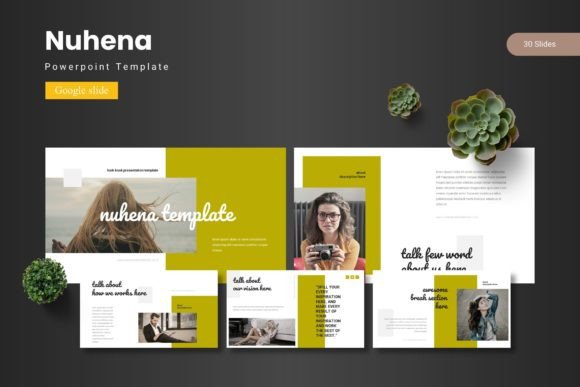
Nuhena - Google Slide Template is a presentation toolkit built specifically for Google Slides. It includes 150 total slides organized across five distinct color schemes, with each scheme offering 30 slides. The structure is built around master slides, which means design consistency is maintained even as you customize content. The set includes section break slides, handcrafted infographics, pixel-perfect illustrations, and picture placeholders with drag-and-drop functionality. It also features gallery and portfolio slides, making it suitable for both narrative-driven and visual-heavy presentations.
What sets this template apart from simpler options is the sheer volume of content variations. With five color variations and 30 slides per template, you are not locked into a single aesthetic. This allows you to choose a palette that aligns with your brand or the tone of your message while keeping the overall layout structure reliable. The inclusion of master slides means that global changes—like updating a font or adjusting a color—apply across the entire deck, which is a significant time-saver during final edits.
Comprehensive Slide Library and Organization
Having 150 slides available may seem excessive for a single presentation, but the value lies in choice and flexibility. You can pick the exact slide types you need without designing them from scratch. The inclusion of section break slides helps separate topics visually, which is particularly useful for longer presentations or educational modules. The gallery and portfolio slides are not always found in general-purpose templates, making Nuhena - Google Slide Template a good fit for creative professionals who need to showcase visual work.
Color Variation and Consistent Branding
Five premade color schemes allow you to match the template to your organization’s branding or to the mood you want to convey. This variety helps avoid the feeling of using a generic template that clashes with your visual identity. Because the color variations are built into the same master slide framework, switching between schemes does not require reworking individual slides. This is especially valuable for agencies or freelancers who present to multiple clients and need to adapt quickly.
Handcrafted Infographics and Visual Appeal
The handcrafted infographics are a notable strength. They are not generic chart placeholders but designed elements that can communicate data or processes clearly. When you need to explain a concept or illustrate a trend, these graphics reduce the time spent building visuals from scratch. The pixel-perfect illustrations further enhance the professional feel, ensuring that the final presentation does not look like a hastily assembled collection of mismatched images.
Picture Placeholder and Drag-and-Drop Usability
The picture placeholders are designed for easy insertion of images. Instead of resizing and cropping manually, you simply drag and drop your photos into the designated areas. This is a practical feature for anyone who works with product shots, team photos, or portfolio images. It maintains consistent sizing and positioning across all slides, which contributes to a clean, uniform look.
Master Slides and Real-World Efficiency
Master slides are a core feature that directly impacts workflow efficiency. When you need to update a footer, change a background element, or adjust the heading font, you do it once on the master slide, and it propagates throughout the deck. For presentations that require frequent updates—such as monthly reports or pitch decks that evolve—this reduces repetitive manual work. The template includes both a PPTX file and Google Slides format, with 5 PPTX items from Google Slides and 30 slides from Google Slides, plus a folder structure that organizes everything clearly.
Who Benefits Most from Nuhena - Google Slide Template
Given its balance of volume, consistency, and visual variety, this template is well suited for several professional scenarios.
- Entrepreneurs and small business owners who need investor decks, client pitches, or company overviews. The portfolio and gallery slides allow them to present products or services visually, while the infographics help explain business models or market data.
- Marketers and content creators who produce regular presentations for campaigns, webinars, or social media content. Having a template that can be customized by color scheme means faster turnaround without sacrificing quality.
- Educators and trainers who build course materials or workshop decks. The section break slides help organize modules, and the variety of slide types accommodates different content formats—from text-heavy slides to image-focused ones.
- Freelancers and consultants who present to different audiences. The five color options allow them to tailor the look per client without needing multiple template purchases.
- Publishers and bloggers who repurpose presentation content for social media or lead magnets. The clean design and consistent layouts translate well to other formats.
Where It Fits in a Professional Workflow
If you are someone who values structure but also wants room for customization, Nuhena - Google Slide Template fits neatly between rigid corporate templates and fully bespoke design work. It provides a strong foundation without dictating every detail. For teams, the master slide framework ensures brand consistency across multiple contributors. For solo professionals, it reduces the cognitive load of designing layouts from scratch, allowing more focus on content.
Quality, Usability, and Long-Term Value
The template is built on Google Slides, which means it works entirely in the browser, is compatible across devices, and allows real-time collaboration. The quality of the design is evident in the spacing, typography, and visual hierarchy. The pixel-perfect illustrations and handcrafted infographics do not feel like afterthoughts; they are integrated into the overall aesthetic. The drag-and-drop picture placeholders function reliably, which is a small but meaningful detail that improves the user experience.
In terms of long-term value, the five color schemes and 150 slides give you a library you can reuse for multiple projects. If you produce several presentations per year—whether for quarterly reviews, conference talks, or client proposals—the template pays for itself in time saved. The master slide structure also means that even if Google Slides updates its interface or features, your template remains adaptable.
Possible Limitations to Consider
No template is perfect for every situation. Nuhena - Google Slide Template is designed for presentation use, not for print documents or interactive web content. The five color schemes, while varied, may not cover very specialized brand palettes, so you might need to do minor color adjustments for precise brand matching. Additionally, users who prefer complete creative freedom may find the structured layouts a constraint. If you need a highly unconventional or experimental visual style, you might be better served by a fully custom design. The template is also file-based, so you will need to manage the folder of PPTX and Google Slides files—though the folder is organized and includes a readme file for guidance.
Practical Recommendations for Getting the Most Out of It
- Spend a few minutes exploring all 150 slides before starting your deck. Knowing what is available helps you choose the right slide type for each section rather than defaulting to the same layout repeatedly.
- Use the master slides to set your brand fonts, colors, and any recurring elements before you begin adding content. This ensures consistency from the start.
- If you present regularly, create a “template starter” version with your logo and typical footer details saved on the master. This makes each new presentation even faster to build.
- Take advantage of the infographics for data-heavy slides. They are designed to look professional without requiring complex chart creation.
- For portfolio or gallery slides, choose your strongest images and use the drag-and-drop placeholders to maintain alignment. This gives a polished gallery feel with minimal effort.
- If you need a specific color that is not in the five schemes, you can adjust the colors on individual slides while still benefiting from the layout and structure.
Final Observations on Nuhena - Google Slide Template
For professionals who need to produce clean, consistent, and visually appealing presentations without investing hours in design work, Nuhena - Google Slide Template offers a practical and well-crafted solution. Its combination of volume, color variety, master slide efficiency, and thoughtful details such as handcrafted infographics and picture placeholders addresses real workflow needs. While it may not suit those who require a fully bespoke or experimental aesthetic, it serves the vast majority of business, educational, and creative presentation tasks effectively. The template respects your time by providing structure where it matters and flexibility where you need it. Whether you are preparing an investor pitch, a classroom module, or a portfolio showcase, this set gives you a solid starting point that you can tailor to your message and audience.