Somase Google Slide Template: Build Better Presentations Faster
You sit down to create a presentation. The blank slide stares back at you. You need something professional, but you also need it done before the end of the day. This is where a well-made template changes the game. The Somase - Google Slide Template is built for exactly this moment—when you want structure without sacrificing creativity. It gives you a head start so you can focus on your message instead of spending hours aligning text boxes.
Whether you are preparing a pitch for investors, a quarterly report for your team, a portfolio to land new clients, or an educational deck for students, the way your slides look matters. People judge content partly by its delivery. A clean, consistent, and visually engaging presentation holds attention. The Somase - Google Slide Template offers a practical path to that outcome without requiring you to be a designer.
What Exactly Is the Somase Google Slide Template?
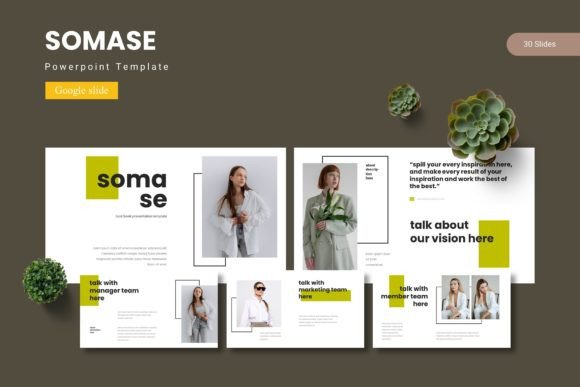
At its core, this is a complete set of pre-designed slides created specifically for Google Slides. The template includes 150 total slides spread across 5 premade color variations, with each color scheme containing 30 slides. That means you get a full deck ready to go, no matter which palette suits your brand or project.
The template is built on master slides, which is a fancy way of saying the layout rules are baked into the file. When you add or duplicate a slide, it automatically matches the style of the rest. No manual formatting. No copying and pasting elements one by one. Just consistent design from start to finish.
Inside the download, you will find:
- 5 separate PPTX files (one for each color variation)
- 30 slides per file, fully editable
- Google Slides compatible files with a readme guide
- Pixel-perfect illustrations that scale cleanly
- Picture placeholders for drag-and-drop image insertion
- Handcrafted infographic elements
- Section break slides to divide your content
- Gallery and portfolio slide layouts
The package also includes a Readme First document with font information and photo details, so you know exactly what you are working with before you start editing.
Who Is This Template For?
The Somase - Google Slide Template serves a wide range of users. If any of the following describes your situation, this template could be a practical fit:
Business Owners and Entrepreneurs
You pitch to partners, present to stakeholders, or walk investors through your roadmap. Every slide needs to look intentional. With this template, you get slide layouts that support data, storytelling, and visuals without feeling cluttered. The section breaks help you transition between topics smoothly, and the infographic elements let you present numbers in a digestible way.
Freelancers and Creative Professionals
Whether you are a designer, photographer, writer, or consultant, your portfolio matters. The gallery and portfolio slide layouts in this template give you a framework to showcase your work. You simply drop your images into the placeholders, and the composition stays balanced. This saves you from rebuilding a portfolio layout every time you land a new project.
Marketers and Content Creators
Webinars, client reports, campaign recaps, social media strategy decks—marketers produce presentations constantly. The Somase - Google Slide Template gives you a consistent visual language across all those formats. Having 150 slides to choose from means you can pick the layout that fits each piece of content rather than forcing content into a one-size-fits-all slide.
Educators and Trainers
Teaching materials need to be clear and engaging. Section break slides help you organize modules, while infographic slides simplify complex topics. The template’s clean design keeps the focus on the content, not on distracting decorations. Students and trainees can follow along without visual noise pulling their attention away.
Key Features That Make a Difference
Not all templates are created equal. Some look great on the surface but fall apart when you try to edit them. Here is what sets the Somase - Google Slide Template apart in practical use:
Master Slide Foundation
Because the template is based on master slides, every element is locked into a consistent structure. When you change a font color on the master slide, it updates across all slides. This is especially useful if your client decides they want a different accent color halfway through the project. You fix it once, and it propagates everywhere.
Five Color Variations
Having 5 premade colors means you are not stuck with one option. You can choose the palette that best aligns with your brand or the tone of your presentation. Each color scheme includes 30 slides designed specifically for that palette, so nothing looks like a leftover from another version.
Resizable and Editable Graphics
Every illustration and icon in the template is fully resizable and editable. You can scale elements up or down without losing quality. You can also recolor them to match your specific needs. This is important because stock graphics that cannot be modified often force compromises in your layout.
Drag-and-Drop Picture Placeholders
The template includes built-in image placeholders. You drag your photo into the frame, and it automatically fits the dimensions. No cropping, no resizing, no frustration. If you are someone who works with a lot of images—screenshots, product photos, team headshots—this feature alone saves significant time.
Handcrafted Infographics
Data slides are notoriously hard to design from scratch. The infographic elements in this template come pre-built and ready for your numbers. You can use them for timelines, comparisons, statistics, and processes. They look polished without requiring you to learn diagramming tools.
Real-World Scenarios and Applications
Let me walk through a few concrete situations where the Somase - Google Slide Template fits naturally into a workflow.
Scenario One: The Q4 Business Review
You are the operations lead at a mid-size company. You need to present Q4 results to the executive team. The data includes revenue growth, customer acquisition numbers, and operational highlights. Using the infographic slides, you turn raw numbers into clear bar charts and comparison graphics. The section break slides separate quarters visually. The consistent color scheme keeps the deck looking unified across 25 slides. You finish editing in under two hours.
Scenario Two: The Freelance Portfolio
You are a web designer pitching to a potential client in the retail space. You want to show three previous projects with before-and-after screenshots. The gallery and portfolio layouts let you place images side by side. The picture placeholders handle the sizing automatically. You add a short description under each image using the pre-formatted text areas. The result is a polished portfolio deck that feels custom-made.
Scenario Three: The Online Course Module
You are a marketing educator creating a module on SEO fundamentals. You need slides for definitions, case studies, statistics, and action steps. The template’s variety gives you slide types that match each content block. The section break slides clearly separate the introduction from the main content and the summary. Students appreciate the visual structure because it helps them follow the flow of information.
Strengths and Practical Considerations
No template is perfect for every situation. Here is an honest look at where the Somase - Google Slide Template excels and where you might want to plan ahead.
Strengths
- Time savings: You eliminate the layout phase entirely. Start with a well-designed slide and replace the placeholder content.
- Consistency: Master slides ensure every slide matches. No accidental font changes or misaligned headers.
- Volume: 150 slides give you plenty of options without needing to look elsewhere for additional layouts.
- Editable: Unlike some templates that lock elements, everything here can be changed—colors, text, images, and graphics.
- Platform-native: Built for Google Slides, so you work in the browser without installing software. Collaboration features like comments and sharing work natively.
Considerations and Limitations
- Font dependency: The template relies on specific fonts for its designed look. The Readme file includes font details, but you may need to download and install fonts if they are not already available in Google Slides.
- Color scheme lock-in at file level: Each PPTX file contains one color variation. Switching colors means opening a different file. You cannot toggle between all five inside a single deck without manual effort.
- Learning curve for master slides: If you are new to master slides, editing the underlying structure may take a few minutes of exploration. The Readme guide helps, but a brief tutorial on Google Slides master slides would accelerate your comfort level.
- Over-template risk: With 150 slides available, it is tempting to use too many different layouts in one deck. A focused selection of 10 to 15 slide types usually creates a stronger presentation than using every option.
How to Evaluate Whether This Template Suits Your Project
Before downloading any template, ask yourself a few questions. Your answers will tell you whether the Somase - Google Slide Template matches your needs.
What is the tone of your presentation? This template leans toward modern, clean, and professional. It works well for business, education, and creative portfolios. If you need something playful, hand-drawn, or highly formal, other options might fit better.
How many slides do you need? With 30 slides per color scheme, you have room to build a comprehensive deck. If your presentation is very short, you can select only the slide types you need. If it is very long, you may want to combine multiple color files or reuse layouts.
Will you collaborate with others? Google Slides shines in collaborative environments. Because the template is native to the platform, team members can edit simultaneously. Comments, suggestions, and version history all work as expected.
How much customization do you plan to do? If you intend to heavily modify colors, fonts, and graphics, the editable nature of this template supports that. If you prefer to keep the design as-is and just swap text, that works equally well.
Final Thoughts on the Somase Google Slide Template
The Somase - Google Slide Template is a practical tool for anyone who creates presentations regularly. It removes the friction of starting from a blank slide and provides enough variety to cover most presentation needs. The master slide structure ensures consistency, the five color options give flexibility, and the handcrafted infographics add a professional touch without extra work on your part.
If you have ever spent too much time formatting slides instead of refining your message, this template offers a better way forward. It does not promise to make you a designer overnight. What it does is give you a reliable, visually coherent foundation so you can build presentations that look like they took twice the time they actually did. And in most real-world scenarios, that is exactly what you need.