Careema Google Slide Template: Built for People Who Actually Need to Present Something
If you have ever opened Google Slides and stared at a blank white screen for twenty minutes wondering where to start, you already know how much a decent template matters. The default options inside Google Slides are fine if you need a quick title slide for a book club meeting. But when you are putting together a client pitch, a product launch deck, or a portfolio that actually represents the work you do, you need something that already looks like it belongs in a boardroom or on a website. That is exactly where Careema comes in.
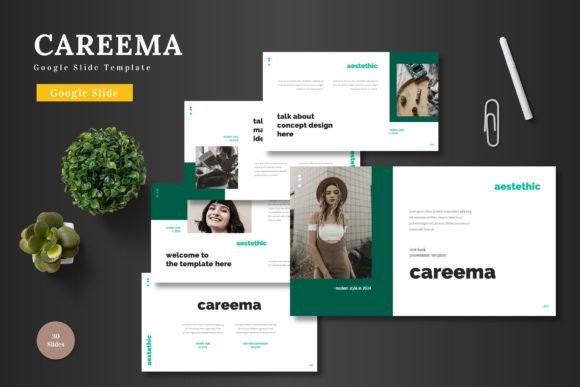
Careema is a Google Slide Template designed to be clean, scalable, and colorful without being distracting. It comes with 150 total slides across five premade color schemes, which means you are not stuck trying to match fonts and accent colors from scratch. Each color variation contains 30 slides, so whether you are building a short investor update or a full product walkthrough, you have enough room to tell the whole story without repeating layouts. The template is built entirely on Google Slides shapes, so nothing requires external software. You edit everything right inside your browser. Drag your images into placeholders, swap the colors, adjust the text, and you are done. There is also an animated slide included for when you want a little motion to keep attention during a live presentation.
Let me walk through where this template actually makes sense in real life, because generic feature lists do not tell you whether a tool fits your specific situation.
Pitching to clients or investors without the design headache
If you run a small agency, do freelance consulting, or have ever had to present a quarterly update to stakeholders, you know that the content matters more than the slide borders. But the reality is that people judge the content partly by how it looks. A pitch deck with mismatched fonts and inconsistent spacing signals that you might not pay attention to details. Careema gives you a structure that already looks polished, so you can focus on the numbers, the strategy, and the story.
The template includes section break slides, which are incredibly useful when you transition from one topic to another. Instead of just fading to a new title, you get a clean visual pause that tells your audience we are moving to a new part of this conversation now. That small touch keeps people oriented, especially in longer decks where you cover market analysis, product details, financial projections, and your ask within the same presentation.
For a pitch deck, you might use the portfolio or gallery slides to showcase past work or case studies. The picture placeholders let you drag in screenshots or product photos without resizing and cropping manually. If you are pitching an e-commerce product, for example, you can drop product shots directly into the layout and the template handles the alignment. That saves you from fighting with Google Slides image tools in the middle of a tight deadline.
Building a product promotion deck for e-commerce or launch campaigns
Careema is listed as suitable for e-commerce and product promotion purposes, and that is not just a generic tagline. If you sell physical products, digital downloads, or even services packaged as products, you need a way to present features, benefits, pricing, and social proof in a format that feels professional without being boring.
One of the more practical features here is the handcrafted infographics built into the template. Instead of trying to hack together a comparison chart or a timeline using basic shapes and arrows, you get infographic slides that are already proportioned and color-coordinated. For a product launch, you might use a timeline infographic to show your development milestones or a comparison infographic to differentiate your product from alternatives on the market. Because everything is built on master slides, you can reuse those layouts across the deck and the colors stay consistent.
The five color variations also help here. If your brand uses a specific palette, you can pick the scheme that comes closest and adjust from there. If you do not have a strict brand guide yet, the premade color options give you a starting point that looks intentional. You avoid the trap of choosing clashing colors at two in the morning because you are tired of looking at the same deck.
Creating a portfolio that actually gets viewed
Freelancers, designers, photographers, writers, and other creative professionals often need to send portfolio decks to potential clients. A PDF attachment or a link to a Google Slides presentation can work, but only if the layout does not distract from the actual work. Careema includes gallery and portfolio slides designed specifically for showing visual content. The image placeholders are large enough to let the work breathe, and the text areas are positioned so that descriptions or project titles stay readable without competing with the visuals.
If you are a photographer, you can use the full-bleed image layouts to let your photos take center stage. If you are a copywriter or marketer, you can pair case study summaries with results screenshots on the same slide. The template is flexible enough that the same deck structure works for multiple creative disciplines. You are not locked into a rigid format that only works for one type of content.
For educators or trainers who need to present course materials or workshop content, the structure is equally useful. The section break slides can separate modules, the infographics can illustrate concepts or data, and the bullet-friendly layouts keep text organized without turning into walls of words. If you teach a recurring workshop, you can build the deck once and adjust the content each time without redesigning the layout.
Marketing presentations, team updates, and internal communications
Not every presentation goes to clients or investors. Sometimes you need to align your own team around a new strategy, share campaign results, or present a content calendar. For internal decks, you do not need flashy animations or elaborate visuals, but you do need clarity. Careema keeps things clean enough for internal use while still looking professional enough that your team takes the content seriously.
The scalability of the template also matters here. If your company rebrands or updates its color palette, you can adjust the Careema slides to match without rebuilding everything. Since the template is based on master slides, color changes propagate across the entire deck. That makes it useful for agencies or marketing teams that manage multiple client decks or campaign variations. You can duplicate the file, switch the color scheme, replace the placeholder images, and have a new deck ready in significantly less time than starting from scratch.
What to consider before you start using Careema
No template solves every problem, and it helps to know what Careema is best for before you commit to it. First, this is a Google Slides template, not a PowerPoint file, although the main file includes PPTX versions for each color scheme. If your workflow requires PowerPoint, you have that option. But the real strength is in Google Slides because you can edit from anywhere, collaborate in real time, and avoid version control headaches. If your team works remotely or across different operating systems, Google Slides with a well-built template is often smoother than emailing PowerPoint files back and forth.
Second, while the template offers 150 slides across five color schemes, you do not need to use all of them. The idea is that you pick one color variation and use the 30 slides within that scheme to build your deck. Do not feel pressured to fill every layout. A strong presentation often uses fewer slides with clearer content. The variety exists so you can choose the right layout for each piece of information, not so you can cram in every possible slide type.
Third, the template includes pixel-perfect illustrations and graphics that are resizable and editable. That means you can scale elements up or down without losing quality, and you can change colors or reposition elements as needed. But because everything is built in Google Slides shapes, complex illustrations may take a little more effort to edit than simple text boxes. If you are comfortable with basic shape manipulation in Google Slides, you will be fine. If you are newer to design, stick with the premade color schemes and placeholder swaps at first.
Finally, the animated slide is a nice touch for opening or closing a presentation, but do not overuse animation across the entire deck. One or two animated moments keep attention without making your audience motion-sick. Use it strategically, not everywhere.
Who gets the most out of Careema
In practice, the people who benefit most from Careema are those who need to produce presentations regularly but do not have a dedicated designer on hand. That includes entrepreneurs pitching to investors, marketing managers presenting campaign results, freelancers sending portfolio decks, and educators building course materials. If you create more than a few presentations per year and you care about how they look, a template like this saves you time and inconsistency.
Small business owners also gain a lot here. You might not have the budget for a custom-designed deck, but you still need to present your business to partners, at networking events, or during webinars. Careema gives you a professional baseline that you can customize with your own content and images. You do not need design skills to make it look good, and you do not need to learn complex software. Everything happens inside Google Slides, which you probably already use.
Bloggers and content creators who create downloadable lead magnets or free resources can also use Careema to build branded PDF-style presentations. Since Google Slides allows you to publish to the web or download as PDF, you can create content upgrades, media kits, or sponsor decks using the same template structure. The gallery slides work especially well for media kits where you showcase your reach, audience demographics, and past collaborations.
Making it yours without overthinking it
The best thing about a template like Careema is that it removes the friction between having an idea and putting it in front of people. You do not need to decide font pairings, figure out where to place your logo, or wonder whether your accent color works with your background. Those decisions are already made. You just open the file, pick your color scheme, replace the placeholder text with your real content, and drop your images into the designated spots.
For people who need to maintain quality across multiple presentations, the consistency alone is worth the download. If you create a monthly report deck, a quarterly investor update, and a one-time product launch, using the same template family means your brand presentation stays consistent even though the content changes. Your audience gets familiar with your visual language, and you spend less time rebuilding layouts.
Careema is not a magic bullet. If your content is weak or your data is unclear, no template will fix that. But if you have solid material and just need a clean, scalable, and professional container to put it in, this template handles the heavy lifting. That leaves you free to focus on the parts of your presentation that actually move people: your story, your evidence, and your message.