Goraco Google Slide Template: Flexible Presentations
When you need to build a presentation that feels polished without starting from a blank slate, templates offer a practical shortcut. The Goraco Google Slide Template is one such resource designed to help you structure slides quickly while retaining room for personalization. Whether you are preparing a client pitch, a classroom lecture, or a portfolio showcase, this template provides a foundation that balances visual appeal with functional flexibility.
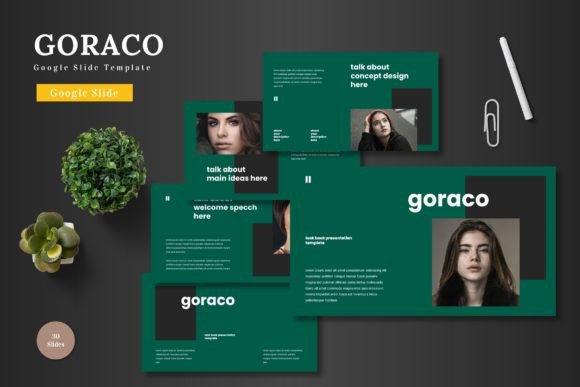
The template includes 150 total slides spread across five premade color schemes, with 30 slides per set. That means you can pick a palette that fits your brand or mood without spending extra time adjusting hues. Each set comes with section break slides, handcrafted infographics, and gallery or portfolio layouts. The files are built on master slides, so any global changes you make apply consistently throughout your deck. All graphics are resizable and editable, and picture placeholders let you drag and drop images directly into place.
For someone who creates presentations regularly, this kind of structure saves hours. For someone who only needs a one-off deck for a team meeting, it removes the intimidation of design decisions. Let’s look at how different people might approach the same template and what they would prioritize.
Why the number of slides matters to different users
At first glance, 150 slides may sound excessive. But the value lies in variety, not quantity. You are not expected to use every slide. Instead, you get choices: multiple ways to present data, show images, introduce sections, and close a topic. A beginner might appreciate having more options than they need because it reduces the pressure to invent layouts from scratch. A seasoned presenter, on the other hand, might use the same template to produce several distinct decks for different clients by simply switching the color scheme.
Entrepreneurs and small business owners often juggle multiple presentations for investor meetings, product demos, and team updates. Having five color variations means they can repurpose the same slide structure for different contexts without confusing their audience. A tech startup founder could use the dark scheme for a formal pitch and the lighter one for an internal training session, all within the same template file.
The five color schemes and what they offer
The template comes with five premade colors. For a marketer, this is a quick way to align slides with brand guidelines. For a freelancer who works with several clients, each color set can represent a different brand identity. Educators might choose a high-contrast scheme for better readability on projectors, while a blogger creating a video presentation might opt for a more vibrant palette to keep viewers engaged.
The color variations are not just cosmetic. They change the tone of the entire deck. A dark background with bright accents feels modern and bold, suitable for creative agencies or tech products. A lighter, pastel-based scheme feels approachable and works well for lifestyle content or educational material. Knowing this helps you choose a template not just by looks but by the emotional response you want to evoke.
Handcrafted infographics and visual storytelling
Infographics are one of the most effective ways to communicate complex information quickly. The Goraco template includes handcrafted infographic slides that are already built and editable. This matters differently depending on your role. A data analyst who needs to present quarterly results can customize these infographics without hiring a designer. A blogger who writes tutorial content can use them to illustrate steps or comparisons.
For educators, these infographics serve as a visual aid that can make abstract concepts more concrete. Instead of drawing diagrams by hand or searching for generic images, you get a library of visual assets that are consistent in style. That consistency is hard to achieve when you mix and match resources from different sources. With master slides, every infographic inherits the same fonts, colors, and spacing, so the entire presentation looks cohesive.
Picture placeholders and drag-drop simplicity
One of the features that saves the most time is the picture placeholder system. Instead of resizing and cropping every image manually, you simply drag a photo into the placeholder, and it snaps into position. For a photographer or visual artist building a portfolio, this is invaluable. You can swap images quickly to create multiple versions of your portfolio for different galleries or clients.
For a hobbyist who is not comfortable with design software, this feature removes a major barrier. You do not need to know how to mask images or align objects. The template does the layout work for you. This lowers the learning curve significantly, which is why beginners often find templates easier to use than starting from scratch.
For a professional presenter who values speed, the same feature means you can update a last-minute slide without breaking your flow. You can replace an image seconds before a meeting and trust that the layout will hold up.
Who benefits from the 30-slide structure per color
Having 30 slides per color scheme gives you room to build a complete narrative. A standard business pitch usually runs between 10 and 20 slides. An educational module might need 15 to 25 slides depending on the topic depth. A portfolio showcase could go up to 30 slides if you are presenting a wide range of work. The template accommodates these different lengths without forcing you to reuse the same layout repeatedly.
Content creators who produce video presentations or slide decks for social media can also benefit. You can pick slides from one color scheme to create a short sequence, then reuse the same template with a different color for your next project. This keeps your content fresh without requiring a completely new design each time.
Small business owners who wear multiple hats often need to produce presentations for different purposes within the same week. The 30-slide structure lets you build a library of slides that you can mix and match across decks. Over time, you develop a personal template library that speeds up your workflow considerably.
What to look for when evaluating this template
If you are considering whether Goraco fits your needs, start by thinking about your typical presentation length and audience. A freelancer pitching to corporate clients might prioritize the clean, professional layouts and the ability to switch colors per client. A teacher or trainer might look for readability and the presence of infographic slides that simplify explanations. A blogger or online course creator might focus on the gallery and portfolio slides to showcase work samples visually.
Ease of use is a common priority across all groups. Because the template is built on master slides, editing is straightforward. You change a font or a color on the master slide, and it updates every slide in seconds. This is especially useful for non-designers who want consistent branding without manual work.
Cost is another factor. A single template like this costs a fraction of what you would pay a designer for a custom deck. For entrepreneurs and hobbyists operating on a tight budget, this makes professional-looking presentations accessible. For educators, it means you can invest once and reuse the template across multiple classes or semesters.
Long-term usefulness and flexibility
One question that often comes up is whether a template remains useful after the first few projects. With five color schemes and 150 slides, the variety is enough to keep the template relevant for different topics and formats. You are not locked into a single look. As your skills grow, you can modify the slides more extensively, adding your own graphics or rearranging elements.
For a beginner, the template acts as a learning tool. By studying how the slides are structured, you start to understand layout principles, color pairing, and information hierarchy. Over time, you may feel confident enough to customize the template heavily or even build your own layouts from scratch. That learning value is something a more experienced user might overlook, but for someone new to presentations, it can be a stepping stone to greater creative control.
For a professional who already knows design principles, the template is a productivity tool. You skip the repetitive work of positioning elements and focus on the content itself. The time saved can be redirected toward refining your message or rehearsing your delivery.
How the template fits into your workflow
The main file includes five PPTX items from Google Slides and 30 slides per theme, plus a folder with read me first instructions, font information, and photo details. If you work primarily in Google Slides, the format integrates directly with your existing setup. No need to convert files or download extra software. If you use PowerPoint, the PPTX format also works there, giving you cross-platform flexibility.
For teams that collaborate on presentations, the template helps maintain visual consistency across multiple contributors. Each person can work on their section without worrying about mismatched styles. The master slides act as a style guide that everyone follows automatically.
Hobbyists and casual users might appreciate the included photo information, which guides you on where to find suitable images. This removes the guesswork of sourcing visuals that match the template’s style.
Deciding if Goraco matches your goals
No template works for everyone, and the right choice depends on your skill level, project type, and personal preference. If you value speed and consistency over complete creative freedom, this template is a strong candidate. If you need a wide range of slide types including sections breaks, infographics, and portfolios, the variety here covers those bases.
Beginners will find the drag-drop functionality and master slide structure reassuring. Experienced users will appreciate the scalability and the ability to switch between color schemes for different contexts. Creators and educators can rely on the infographics and picture placeholders to communicate visually without extra effort. Entrepreneurs and small business owners can treat the template as a reusable asset that reduces preparation time for every new presentation.
Ultimately, the Goraco Google Slide Template offers a practical middle ground: enough structure to guide you, enough flexibility to let you adapt. Whether you are pitching, teaching, sharing, or showcasing, having a reliable set of slides can make the process smoother and the final result stronger.