Ceroma Powerpoint Template: Versatile Slides for Every Need
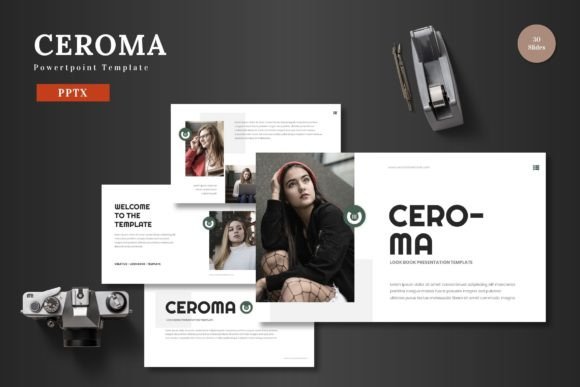
Creating a presentation often feels like a race against time. You need something that looks sharp, works across different topics, and doesn't require hours of tweaking. That is exactly where Ceroma fits in. This Powerpoint template offers a ready-to-use foundation with clean design, flexible layouts, and thoughtful details that make it suitable for everything from a business pitch to a personal portfolio. Whether you are preparing slides for a client meeting, a product launch, or a school project, Ceroma helps you get there faster without sacrificing quality.
What Makes Ceroma a Practical Choice
At its core, Ceroma is built around the idea that a presentation template should adapt to your content, not the other way around. The design is clean and scalable, meaning it works just as well on a large screen as it does on a laptop or tablet. The color palette is vibrant but not overwhelming, with five premade color schemes that let you switch the look of your entire deck in seconds. Each scheme includes 30 slides, giving you a total of 150 slides across the whole template. That is a lot of flexibility wrapped into one package.
All graphics and illustrations are pixel-perfect and fully resizable. You can drag, drop, and adjust every element directly inside Powerpoint without needing Photoshop or any other external software. The template is based on Master Slides, which makes global changes quick and consistent. If you decide to swap out colors or fonts, the update applies across the entire presentation automatically.
Who Can Benefit from Ceroma
Ceroma is designed for a broad audience. Entrepreneurs working on a pitch deck will find the structure intuitive for outlining business models, market analysis, and growth projections. Marketers can use it to showcase campaign results, product features, or brand stories. Freelancers and creative professionals will appreciate the gallery and portfolio slides for displaying work samples elegantly. Educators and trainers can adapt the layouts for workshops, lectures, or onboarding materials. Even hobbyists who want to present a personal project or a photo collection will find the drag-and-drop picture placeholders easy to use.
The template does not assume you are a design expert. Everything is straightforward. You click on a placeholder, insert your image, and the slide adjusts. You type your text, and the formatting stays consistent. This lowers the barrier for anyone who needs a polished presentation but does not have the time or skills to build one from scratch.
Realistic Use Cases for Ceroma
Imagine you are preparing a pitch deck for potential investors. You need slides that communicate your value proposition clearly, show financial data in a digestible way, and tell a compelling story. Ceroma gives you section break slides to separate different parts of your presentation, infographic layouts to visualize data, and clean text slides to explain your vision. The handcrafted infographics are particularly useful here because they turn numbers into visuals that are easy to grasp.
If you are launching an e-commerce product, you might need slides that highlight product features, compare options, and showcase customer testimonials. Ceroma includes slides designed for product promotion, with image placeholders that let you drop in product shots, and layouts that balance text and visuals effectively. You can maintain brand consistency by choosing one of the five color variations that matches your brand palette.
For a personal portfolio or a creative showcase, the gallery and portfolio slides let you present images in a clean grid or a slider-like layout. Photographers, designers, and artists can let the visuals speak for themselves while keeping the overall presentation cohesive. The animated slides add a subtle layer of polish without being distracting, making your work feel dynamic during a live presentation.
Key Features That Simplify Your Workflow
- 150 total slides across 5 color schemes – You get 30 slides per template variation, giving you enough material to cover any topic without running out of layout options.
- Section break slides – These help you organize longer presentations into clear chapters, making it easier for your audience to follow along.
- Handcrafted infographics – Built directly in Powerpoint, these are fully editable. You can change colors, resize elements, or adjust data points as needed.
- Picture placeholders with drag-and-drop – No need to crop or resize images beforehand. Just drop them in, and the template handles the rest.
- Pixel-perfect illustrations – Every visual element is sharp and scalable, so your presentation looks professional on any display.
- Master Slide-based editing – Change a font or color once, and it propagates through the entire deck. This saves time and ensures consistency.
- Animated slides – A few slides include subtle animations that add movement and engagement without overwhelming your content.
The main file includes five PPTX files in widescreen format, a Readme file with font and photo information, and clear instructions to get started. Everything is ready to use the moment you open it.
Important Considerations Before You Start
While Ceroma is designed to be beginner-friendly, a few things are worth noting to get the best results. First, the template relies on specific fonts that are listed in the Readme file. You may need to install those fonts on your computer if they are not already available. This ensures that your presentation looks exactly as intended when you share it with others.
Second, the picture placeholders work best when you use high-resolution images. Low-quality photos can look stretched or pixelated, especially on larger screens. Always use the best version of your images to maintain a professional appearance.
Third, the animated slides are subtle, but if you plan to present in a formal or conservative setting, you might want to review them beforehand. You can easily remove or modify animations directly in Powerpoint if needed. The template gives you full control over every element, so you can adjust the tone as necessary.
Finally, consider your audience. Ceroma is colorful and modern, which works well for most business and creative contexts. However, if you need an extremely minimal or strictly corporate look, you might want to choose a color scheme that leans neutral. The five options give you enough range to match different tones.
Why Ceroma Stands Out Among Powerpoint Templates
There are many Powerpoint templates available, but Ceroma strikes a rare balance between variety and simplicity. You get 150 slides, but navigating them does not feel overwhelming because they are organized into logical groups. The five color schemes are not just palette swaps; they come with slightly different moods, so you can choose the one that fits your topic best. The infographics are genuinely useful and editable, which is not always the case with pre-built graphics. And the fact that everything is built on Master Slides means you can maintain a consistent look across a long presentation with minimal effort.
Another aspect worth mentioning is the support for both personal and professional needs. Whether you are presenting to a boardroom or a classroom, the template adapts. It does not force you into a rigid structure. You can skip slides, rearrange them, or combine elements from different color schemes if you want. The only limit is your imagination.
Practical Tips for Making the Most of Ceroma
Start by browsing through all 150 slides in your chosen color scheme. This gives you an idea of what is available and helps you plan your presentation structure. Use section break slides to divide your content into clear parts. Replace placeholder images with your own photos or graphics early on, so you can see how the layout looks with your actual content. Adjust the text to fit your message, but keep the slide titles and hierarchy consistent for readability.
If you are presenting data, use the infographic slides to turn numbers into visuals. Bar charts, flow diagrams, and comparison layouts are already built in. You just need to edit the labels and values. For product presentations, use the portfolio and gallery slides to showcase images in a clean format. The drag-and-drop feature makes this process fast and hassle-free.
Once your content is in place, review the animations. Make sure they enhance your delivery rather than distract from it. Practice your presentation with the animations to confirm that the timing works well. Finally, export your file or save it in the format you need. The widescreen format is ideal for most modern projectors and screens.
Final Thoughts
Ceroma is a practical, well-rounded Powerpoint template that serves a wide range of users and purposes. Its clean design, editable elements, and thoughtful features make it a solid choice for anyone who wants to create professional presentations without starting from zero. The 150 slides across five color schemes give you plenty of room to experiment, while the Master Slide foundation keeps everything consistent and easy to update. Whether you are preparing a business pitch, an e-commerce product launch, a creative portfolio, or an educational session, Ceroma provides the structure and flexibility you need to present your ideas with confidence.