Emaros - Google Slide Template
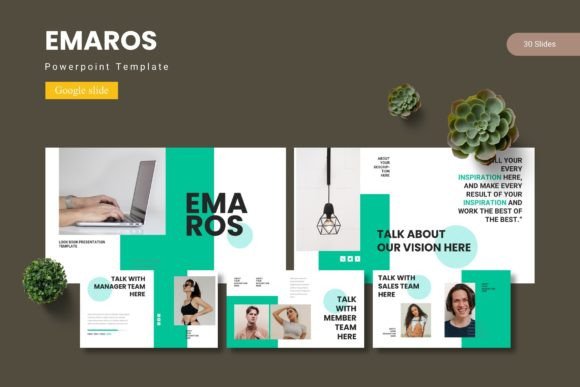
Great presentations don’t happen by accident—they are carefully crafted blends of structure, color, and visual rhythm. The Emaros - Google Slide Template offers a complete toolkit for designers, marketers, and brand strategists who demand consistency without sacrificing creativity. With 150 total slides spread across five pre-made color variations, this template provides the backbone for everything from investor decks to client pitches, ensuring your visual narrative remains cohesive from start to finish.
Why a Professional Template Matters in Modern Graphic Design
In today’s fast-paced digital landscape, brand identity hinges on every touchpoint—including your slide decks. A mismatched font or inconsistent color palette can weaken trust before you even finish your explanation. The Emaros template is built on master slides, meaning every element—from headline placements to infographic layouts—follows a unified system. This not only saves hours of repetitive formatting but also reinforces visual hierarchy and modern aesthetics that align with current design trends.
Whether you are presenting a packaging design concept, a UX research finding, or a brand identity proposal, slides must communicate clarity and authority. Emaros includes handcrafted infographics, pixel-perfect illustrations, and picture placeholders with drag-and-drop functionality, so your creative assets remain sharp and editable at any stage.
Features That Elevate Your Creative Workflow
Here is what makes the Emaros template a practical asset for graphic design and digital marketing professionals:
- 150 Total Slides – 30 unique slides in each of 5 color schemes, including section breaks and full content spreads.
- 5 Premade Color Variations – Each variant is carefully balanced to support different brand moods, from minimalist gray tones to vibrant accent palettes.
- Master Slide Structure – Any global change—fonts, backgrounds, or spacing—updates across all slides instantly, preserving consistency.
- Scalable Graphics – All illustrations and icons are vector-based, allowing you to resize without quality loss for print design or screen displays.
- Picture Placeholders – Drop your product shots, team photos, or social media graphics directly into dedicated frames, saving alignment time.
The template also comes with 5 separate PPTX files, a Google Slides file for each color, and a folder containing fonts and photo credits—so you can work seamlessly across platforms.
Practical Applications Across Design Disciplines
Branding and logo design presentations benefit from the clean sections and infographic spaces. Use the “Gallery and Portfolio” slide to showcase logo design variations or mood boards. For marketing materials, the section break slides act as chapter openers, helping viewers digest complex campaign data. Social media content strategy decks become more engaging when you embed mockups inside the picture placeholders and pair them with the template’s typography hierarchy.
When working on web design or UI design proposals, the minimal slide backgrounds keep focus on your wireframes and prototypes. Editorial design drafts for magazines or brand guidelines can also be laid out using the multisection structure, where each color variation represents a different chapter or product line. Even packaging design concepts benefit from the large image areas and editable text boxes that accommodate detailed annotations.
Composition and Visual Hierarchy That Works
Every slide in Emaros has been designed with visual hierarchy in mind. Headlines are weighted to draw immediate attention, while subtext and bullet points remain legible through consistent leading and spacing. The color palette choices—light, dark, warm, cool, and neutral—are intentionally separated to prevent visual fatigue across long presentations. Because the template is based on typography principles, font pairs are already balanced: choose a bold sans serif for headers and a clean, readable companion for body copy without guessing.
For digital marketing teams, this means you can create client-facing reports that feel as polished as the product itself. Modern aesthetics like soft shadows, subtle gradients, and clean iconography keep the design contemporary without distracting from your message. The inclusion of 5 color variations also allows you to test different moods—cool blues for finance, earthy tones for sustainable brands, bright accents for tech startups—all within the same layout architecture.
How to Choose and Use Design Elements Effectively
When selecting a template for a specific project, consider the audience and the medium. For a professional presentation aimed at executives, use one of the darker color variations with high contrast text—this conveys authority and reduces glare on projectors. For an internal creative brainstorm, the lighter palettes with playful accent colors encourage an open, energetic atmosphere. Remember that consistency across your brand identity matters: match the template’s color accents to your brand’s primary or secondary logo colors, and replace placeholder fonts with your official typefaces if possible.
Another key factor is scalability. Because the template uses master slides, you can add or remove slides without breaking the design system. Use section breaks to reinforce the narrative arc: a bold divider slide signals a shift in topic, keeping the audience engaged. The infographics included cover bar charts, step-by-step processes, and comparison tables—ideal for advertising campaigns metrics or UX design user flows. If you need to edit a graphic, simply ungroup the vector shapes and adjust colors or labels; no external software required.
Closing Thoughts on Quality Creative Assets
Thoughtful design choices—like the ones built into the Emaros template—do more than beautify a slide; they strengthen communication. When your typography, color palette, and imagery work in harmony, your message becomes easier to understand and remember. Whether you are preparing a digital product pitch, a merchandise line overview, or a comprehensive brand identity guide, investing in a well-structured template like Emaros saves time, reduces friction, and elevates the overall quality of your presentation. The result? Audiences stay focused, clients feel confident, and your design intent shines through without distraction.