Evaluating the Pasriul Keynote Template: Features, Fit, and Practical Considerations
Creating a professional presentation requires more than just good content—it demands clear visual structure, consistent branding, and a design that supports your message. For many professionals, starting from a blank slide deck is neither efficient nor practical. This is where structured templates like the Pasriul - Keynote Template come into play. Offering a comprehensive set of 150 slides across multiple color schemes, this template aims to reduce design time while maintaining a polished look. This article provides a practical evaluation of what the Pasriul template offers, examines its strengths and limitations, and helps you determine whether it aligns with your specific presentation needs.
What Does the Pasriul Template Bring to Your Workflow?
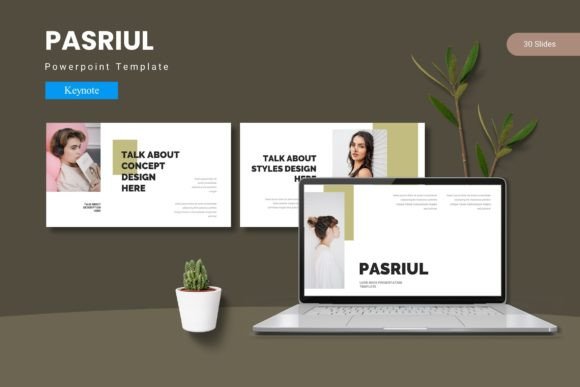
At its foundation, the Pasriul - Keynote Template is built around depth and variety. It includes 150 total slides, organized into 5 distinct pre-made color schemes. Each color scheme contains 30 slides, which means you are not locked into a single aesthetic. This modular approach allows you to choose the palette that best matches your brand or the tone of your presentation, whether it is a formal quarterly report or a creative portfolio review.
The template heavily emphasizes visual communication through handcrafted infographics. Instead of relying on generic icons or basic shapes, you gain access to pixel-perfect illustrations designed to explain processes, comparisons, and data flows. Because all graphics are resizable and editable, you can tailor these visuals to your exact specifications without losing quality. This is particularly valuable for professionals who need to visualize complex information clearly.
Another practical feature is the reliance on Keynote’s Master Slides. By using masters, the template allows you to make global changes to fonts, colors, and backgrounds across your entire deck with just a few clicks. This ensures consistency without manual adjustments. The inclusion of picture placeholders simplifies image integration—simply drag and drop your photos into the designated areas. For those building galleries or portfolio sections, this streamlined workflow can save considerable time.
The package itself is well-organized. It includes the main Keynote file, a folder containing the 5 color schemes, and important setup information such as font details and a Readme file. This structure indicates that the template is designed for users who appreciate efficiency and clear instructions from the outset.
The Distinctive Value of a Structured Design System
To understand what makes the Pasriul - Keynote Template distinct, it helps to consider the broader landscape of presentation resources. On one end of the spectrum, you have minimalist templates that offer a handful of basic layouts. While easy to customize, they often lack the visual richness needed for high-stakes presentations. On the other end, hiring a professional designer yields a fully custom deck, but it comes with a significant budget requirement and a lengthy feedback cycle.
The Pasriul template occupies a valuable middle ground. It provides a complete design system rather than just a collection of slides. The 30 slides per color scheme include section breaks, content layouts, infographic pages, and portfolio slides. This structure mirrors the flow of a professional narrative: introducing a topic, breaking it into logical sections, presenting data, and concluding with a strong visual summary.
The handcrafted infographics are a key differentiator. Many templates offer basic icon sets that require you to build your own visualizations. Pasriul provides pre-built infographic elements that are cohesive and ready to populate with your data. This is especially useful for consultants, analysts, and educators who need to explain trends and relationships without designing charts from scratch. The pixel-perfect nature of these illustrations means they project well on large screens and high-resolution displays, maintaining a crisp appearance that reinforces credibility.
Furthermore, the inclusion of 5 color variations allows for flexibility without requiring design skills. If you work with multiple clients or departments, you can quickly adapt the same slide structure to different brand guidelines. This modularity is a practical advantage over templates that offer only one color scheme, which may force you to manually recolor every element.
When Pasriul Excels: Identifying the Best Use Cases
Choosing a template depends heavily on your typical presentation scenarios. The Pasriul - Keynote Template is particularly well-suited for several common professional contexts.
First, consider business pitches and investor decks. These presentations require clarity, visual impact, and a logical flow. The built-in section breaks help structure your narrative into distinct chapters, while the infographic slides allow you to present market data and growth projections in an accessible way. The professional aesthetic of the template supports the credibility you need when seeking funding or presenting to executives.
Second, the template is an excellent fit for creative portfolios and galleries. The dedicated portfolio and gallery slides, combined with picture placeholders, make it straightforward to showcase your work. Whether you are a photographer, designer, or architect, the ability to drag and drop high-quality images into a pre-designed layout ensures your visuals remain the focus. The clean design does not compete with your content; it enhances it.
Third, internal training sessions and educational workshops benefit from the template’s variety. Delivering a long training module using the same repetitive slide layouts can lead to audience disengagement. With 150 slides at your disposal, you can maintain visual interest throughout the session. The handcrafted infographics help break down complex topics into digestible visual steps, which aids comprehension for learners.
Finally, consultants and agency professionals who produce decks regularly will appreciate the time-saving aspects. The master slide structure, combined with the 5 color schemes, allows you to quickly spin up a branded deck for a new client. Instead of reinventing the layout each time, you focus on customizing the content and data within a proven framework.
Potential Limitations and How to Account for Them
While the Pasriul template offers substantial benefits, no single resource is ideal for every situation. Being aware of its limitations helps you make a more informed decision and adapt your workflow accordingly.
One consideration is the specificity of the design aesthetic. The handcrafted infographics and illustrations have a defined style—clean, modern, and visually structured. If your brand identity requires a strictly minimalist, text-heavy approach, or a very specific photographic style, you may find yourself needing to override many of the template’s core visuals. In such cases, a simpler template with fewer stylistic elements might require less customization. However, because all graphics are editable, a skilled user can adapt the visuals to a certain extent.
Another potential tradeoff is the sheer volume of slides. A 150-slide template is comprehensive, but it can be overwhelming if you only need a short deck. Navigating through numerous layouts to find the right one takes some initial effort. The template relies on you understanding its structure. Taking the time to review the Readme file and explore the master slides upfront is essential to leveraging it efficiently. Without this familiarization, you might feel tempted to use layouts that are not quite right for your content.
Ecosystem compatibility is also a practical factor. This template is built specifically for Keynote. If your team or clients rely heavily on PowerPoint for final delivery or editing, you will need to account for potential conversion issues. While Keynote can export to PowerPoint, complex infographics and master slide dependencies may not translate perfectly. It is advisable to test a few key slides in your target format before committing to the template for a major project. For users deeply embedded in the Apple ecosystem, this is seamless; for cross-platform teams, it requires a validation step.
Finally, like any well-crafted template, there is a risk of looking too generic if you do not personalize it sufficiently. Audiences may recognize a common template style if it is used widely in your industry. To mitigate this, focus on injecting your unique content, customizing colors to your exact brand palette, and selecting photos that reflect your specific story. The template is a foundation, not a finished product.
A Balanced Perspective on Template Options
When evaluating the Pasriul - Keynote Template, it is useful to consider how it compares to other approaches you might take. The decision often comes down to the balance between time, cost, control, and design quality.
If you have strong design skills and ample time, building a presentation from scratch using Keynote’s native tools gives you total creative freedom. You can craft every element to your exact specifications. However, this approach is time-intensive and requires a good eye for typography, color theory, and layout. For many professionals, this is not a productive use of their time.
On the other end, hiring a professional designer guarantees a unique, brand-aligned result. This is ideal for high-stakes events like keynote speeches or major product launches. The downside is the cost and the iterative process required to get the design right. For routine business presentations, this is often an unnecessary expense.
The Pasriul template represents a practical middle path. It offers a high level of design quality and a structured system that saves significant time, at a fraction of the cost of custom design. The key question is whether its aesthetic and structural choices align closely enough with your content that you can adapt it efficiently. If you find yourself fighting the template’s layouts or overriding them heavily, a more modular or minimalist template might serve you better. Conversely, if the structured flow and infographic style resonate with your message, this template can significantly elevate your output with relatively little effort.
Additionally, consider your long-term needs. If you produce presentations regularly, investing time in learning one comprehensive template system pays dividends over time. The master slide structure and color scheme flexibility of Pasriul mean that once you are familiar with it, you can produce consistent, high-quality decks much faster than switching between disparate templates for every project.
Making an Informed Choice for Your Next Presentation
Selecting a presentation template is a practical decision that impacts how your audience perceives your message. The Pasriul - Keynote Template offers a robust feature set centered on variety, visual structure, and ease of use. Its 150 slides, 5 color schemes, handcrafted infographics, and master slide integration make it a strong contender for professionals who need to produce polished presentations efficiently.
The best path forward involves matching the tool to your specific workflow. If you regularly present data-driven pitches, portfolio reviews, or educational content, the depth and structure of this template provide a solid foundation. If your work demands extreme design minimalism or cross-platform PowerPoint compatibility, you may need to weigh those factors carefully. Understanding the tradeoffs between design specificity, file format requirements, and customization effort allows you to make a choice that serves your audience effectively. Ultimately, the right template is one that supports your narrative without adding friction, helping you communicate with clarity and confidence.