Medical Social Media Post Banner: A Practical Guide for Healthcare Content Workflows
Creating consistent, professional social media visuals for a medical or health-related business is a recurring challenge. Between patient confidentiality, regulatory considerations, and the need to communicate complex information clearly, the stakes are high. A Medical Social Media Post Banner isn't just a graphic—it’s a structured asset that fits into a repeatable process for producing trustworthy, visually coherent content. When paired with a well-designed Medical Social Media Post Template, it becomes the backbone of an efficient content operation.
This article walks through what these templates are, how they integrate into real workflows, and how you can use them to maintain quality without reinventing the wheel every time you post. Whether you’re a solo practitioner, a clinic marketing coordinator, or an agency serving healthcare clients, the focus here is on practical execution.
What a Medical Social Media Post Banner Actually Is
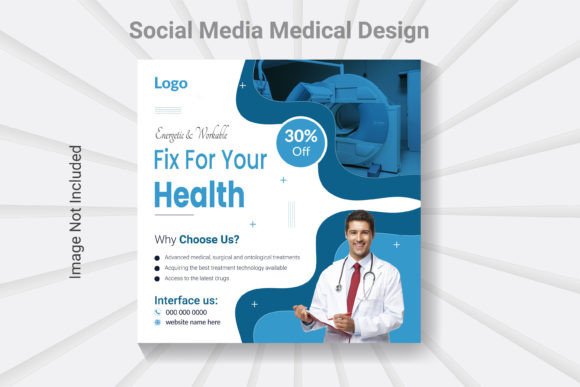
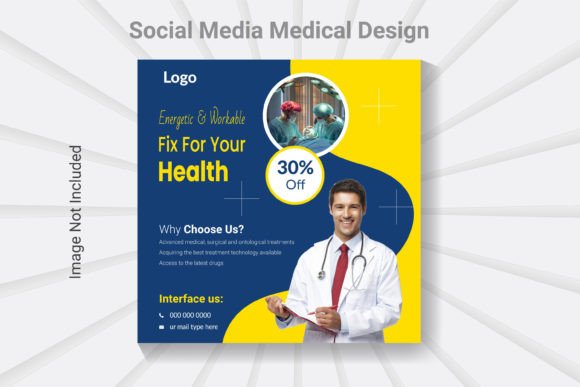
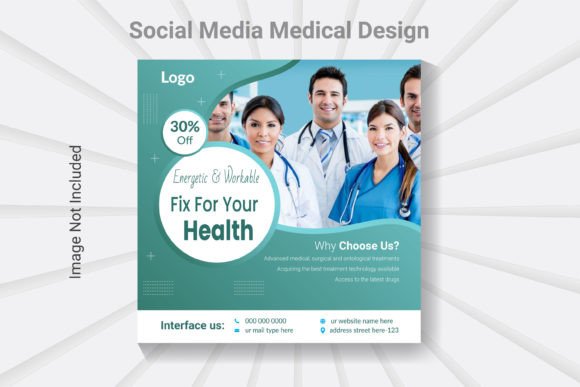
A medical social media post banner is a pre-sized, professionally designed graphic layout tailored for health-related messaging. Typically formatted at 1080 x 1080 pixels (the standard square for Instagram, Facebook, LinkedIn, and many other platforms), it includes placeholders for text, images, and branding elements. The Medical Social Media Post Template files—often provided as layered PSDs in Adobe Photoshop CC—allow you to swap content, colors, and imagery while preserving a cohesive look.
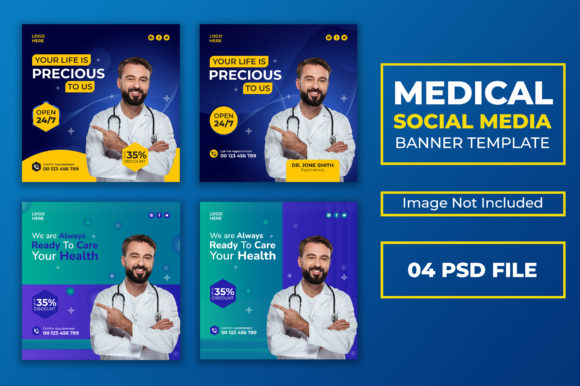
These templates usually come in sets. In this case, you get four PSD files with 100 editable templates, organized for easy navigation. The focus is on clean, modern aesthetics with high resolution (300 DPI) and RGB color mode. Fonts are free to use, and while images are not included, the structure is designed to help you drop in your own visuals quickly.
Where This Fits in a Broader Content Process
Think of a medical social media post banner as a production tool rather than a finished piece. It sits between your content strategy and your publishing schedule. Before you open Photoshop, you should have your messaging planned—maybe a blog post about preventive care, a patient testimonial, or an announcement about new telehealth services. The template then bridges that message and the final visual asset.
It also fits into quality control workflows. When multiple people create posts—perhaps a nurse educator, a marketing intern, and a physician—the template enforces brand consistency. Colors, fonts, and spacing stay uniform, reducing the risk of off-brand or hard-to-read graphics.
Using Templates Before, During, and After a Project
The value of a Medical Social Media Post Template extends across the entire content lifecycle. Here’s how it might play out in a typical workflow.
Before: Planning and Preparation
When you’re mapping out a month of social media content, having a template library changes how you prepare. Instead of designing each post from scratch, you review the available layouts—perhaps a text-heavy banner for health tips, a carousel-friendly design for explaining a procedure, or a simple call-to-action banner for scheduling appointments. You assign templates to each content piece during the planning phase. This saves time and forces you to think about visual variety early.
Preparation also means gathering assets. Because the templates are pre-sized and organized, you can collect images (headshots, stock photos of clinical environments, infographic elements) and know exactly what dimensions you need. The 1080 x 1080 pixel spec means no last-minute cropping or resizing guesswork.
During: Execution and Editing
During the production phase, the editable PSD files make the process straightforward. Open the template, locate the smart object or layer for the image placeholder, and drop in your photo. Adjust the text layers for your headline, body copy, and any disclaimers. Because the file uses well-organized layers, you can change colors to match your brand palette without hunting through menus.
One practical observation: medical content often requires small text for disclaimers or legal notes. The templates are designed with clean layouts that accommodate this without looking cluttered. You can test readability by zooming to 100% view—if it’s clear there, it will be clear on a phone screen.
After: Consistency and Repurposing
After publishing, the template continues to pay dividends. If you need to create a similar post later—say, a seasonal health reminder—you can duplicate the PSD file and modify the copy and image. The underlying structure remains intact, so your visual identity stays coherent across months of posts. This is especially useful for recurring content series like “Wellness Wednesday” or “Ask the Doctor” Q&A sessions.
Repurposing is another after-use. A banner created for Instagram can be resized or adapted for Facebook, LinkedIn, or even a print handout if you maintain the original high-resolution file. The 300 DPI resolution gives you flexibility if you ever need to output for non-digital uses.
Integration with Tools, Platforms, and Teams
A Medical Social Media Post Banner doesn’t live in isolation. It interacts with your broader toolkit and your collaborators.
Software and File Compatibility
These templates are built for Adobe Photoshop CC, which means they rely on layers, smart objects, and adjustment layers. If you work with a team, everyone needs access to Photoshop (or a compatible editor). The help file included provides guidance, which is useful if someone on your team is less experienced with layer-based editing.
If you use other design tools like Canva or Affinity Photo, you may need to export individual layers or re-create the layout, but the PSD format is widely supported for import. For most healthcare marketing workflows, Photoshop remains the standard due to its precision in typography and color management.
Platform-Specific Considerations
While the template is sized at 1080 x 1080 pixels—optimal for Instagram and Facebook square posts—you can adapt it. For LinkedIn, square posts perform well. For Twitter or Pinterest, you might crop to a different ratio, but starting with a square master file gives you a flexible base. Just remember to keep all critical text within the safe zone (the central area that won’t be cropped on any platform).
Team Collaboration
When multiple people contribute to social media, a standardized template reduces friction. The marketing lead can set up the brand colors, fonts, and logo placement in a master PSD file, then distribute copies to others. Each team member simply customizes the content layers without worrying about design consistency. This is especially valuable in medical practices where a physician might want to share a quick health tip without waiting for a designer.
Practical Implementation Tips for Smooth Workflows
Getting the most out of a Medical Social Media Post Template requires a bit of upfront setup. Here are concrete steps to integrate it into your daily or weekly routine.
Organize Your Template Library
Start by categorizing the 100 templates into groups based on content type: educational posts, promotional banners, event announcements, patient appreciation, and compliance or safety messages. Within each PSD file, you might have several layer comps or hidden layers that offer variations. Explore these before you begin editing so you know what each template can do.
- Create a folder structure on your drive: Templates > Medical Templates > [Category].
- Rename template files with descriptive names like “Wellness_Tip_Banner.psd” or “Clinic_Announcement.psd”.
- Keep a separate assets folder with your approved images, logos, and icons so you’re not searching every time.
Set Up a Master Style Guide
Before editing any template, define your brand parameters. Choose a primary color, a secondary accent, and one or two fonts from the free font list provided with the template. Save these as swatches and character styles in Photoshop. This step ensures that every person who opens the file applies the same colors and typography, preserving visual consistency across all posts.
Build a Content-Review Checklist
Medical content has unique requirements. Include a review step for:
- Accuracy of medical claims or health tips.
- Compliance with regulations (HIPAA, FDA, or local guidelines).
- Readability on mobile devices (test at 100% zoom).
- Proper image rights and patient consent if applicable.
- Consistent placement of disclaimers or legal text.
The template’s clean layout makes it easier to spot formatting issues, but human oversight is still essential.
Batch Create to Save Time
If you produce a week’s worth of content at once, open each template, update the text and image, and save as a flattened JPEG or PNG. This batch processing approach leverages the template’s efficiency. Set aside one hour weekly to produce 7–10 posts. Over time, you build a library of ready-to-publish visuals that you can schedule using your preferred social media management tool.
Quality Control and Long-Term Use
Consistency is the primary benefit of using a Medical Social Media Post Banner, but quality control goes beyond matching colors. Because the templates are designed at 300 DPI and 1080 x 1080 pixels, they meet the resolution standards for all major platforms. Blurry or pixelated images are avoided when you replace placeholders with high-resolution files.
Over the long term, you may want to refresh your templates periodically. The 100 editable options give you room to rotate designs so your audience doesn’t see the same layout every week. When a template starts to feel stale, swap the color accents or use a different layout from the same PSD set. This keeps your feed looking fresh without requiring a complete redesign.
Another long-term consideration is file management. Keep your master PSD files untouched and work on copies. If a template becomes corrupted or you need to revert to a previous version, you have a clean original. This discipline is especially important in a medical practice where audit trails and version history might matter for compliance documentation.
Adapting the Template to Your Specific Workflow
Not every healthcare organization works the same way. A solo practitioner might use the template directly, editing it themselves in Photoshop. A larger clinic might have a designated marketing person who handles all visuals. An agency might use the template as a starting point and then customize heavily for each client.
In all these scenarios, the Medical Social Media Post Template reduces friction. It removes the need to build layouts from scratch, which is particularly valuable when you’re juggling multiple content streams. The key is to treat the template not as a rigid box but as a flexible starting point. You can adjust colors, swap fonts, and reorder elements as long as you maintain the overall cleanliness and readability that medical audiences expect.
One Real-World Example
Imagine a dermatology practice planning a campaign about sun protection. The content calendar includes: a statistic about UV damage, a before-and-after treatment result, a product recommendation for sunscreen, and a booking link for skin checks. Using the template set, you could pick four different layouts—one with a large image placeholder for the statistic, one with a split design for the before-and-after, one with a strong call-to-action button, and one with a clean text overlay. Each post feels distinct yet part of a unified campaign. This variety is possible because the template set offers 100 editable options, giving you creative freedom without sacrificing consistency.
Final Observations on Integration
The most effective use of a Medical Social Media Post Banner comes when you embed it into your standard operating procedures. If your team has a weekly content meeting, the template should be part of the production step. If you use a project management tool like Trello or Asana, include a task labeled “Create visuals from medical banner template” with the PSD file attached. Over time, using the template becomes second nature, and the time saved accumulates into hours per month.
Remember that the template is a tool for communication, not a substitute for good content strategy. The banner helps you present information clearly, but the information itself—the health tips, the patient stories, the practice updates—must be accurate, helpful, and respectful. When you combine quality content with a professional, consistent visual framework, you build trust with your audience. And in healthcare, trust is everything.
By treating this template as part of your workflow rather than a one-off design asset, you ensure that every social media post reinforces your brand’s credibility. Whether you’re a freelancer managing multiple accounts or a clinic team producing daily content, the structure and efficiency of a well-made medical social media post banner makes the process smoother, faster, and more reliable.