Seriwa Google Slide Template
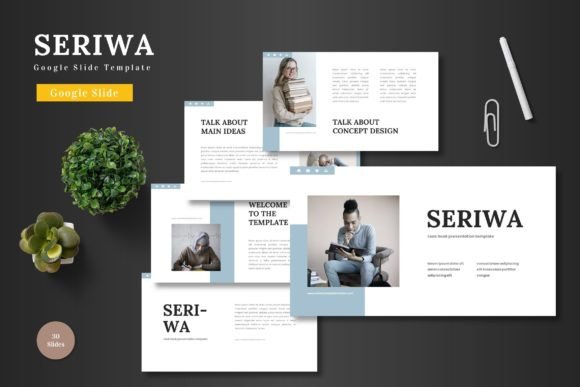
When you need a presentation that looks polished without starting from scratch, a versatile template can save hours. Seriwa is a Google Slides template built around 150 slides spread across five distinct color schemes. Each scheme contains 30 slides, giving you a cohesive set of layouts for almost any scenario. Whether you are preparing a pitch deck for investors, a product catalog for an e-commerce store, or a visual report for your team, Seriwa offers a ready-made structure that you can edit directly in Google Slides.
All elements are built from standard Google Slides shapes. This means you can adjust text, swap images, change colors, and rearrange layouts without leaving your browser. There is no need for Photoshop, Illustrator, or any external tool. The template also includes animated slides, handcrafted infographics, and picture placeholders that let you drag and drop your own visuals. For anyone who values efficiency and professional design, Seriwa provides a solid foundation.
What Makes Seriwa Stand Out
The core strength lies in volume and variety. With 150 total slides, you are not limited to a handful of layouts. You get section break slides, portfolio and gallery pages, infographic elements, and content slides that follow a consistent visual language. The five color variations allow you to choose a palette that fits your brand or project mood without customizing every hue yourself.
Because the template relies on master slides, any global changes you make apply across the entire presentation. This keeps your workflow efficient and your design uniform. The handcrafted illustrations and infographics give the slides a custom feel, even though you are working from a template. For users who need to present data clearly, the infographic slides are particularly helpful for turning numbers into visual stories.
Pixel-perfect graphics ensure that your slides look crisp on widescreen displays. The five included PPTX files each correspond to a different color scheme, so you can open the one that aligns with your project right away. A Readme file and font information are also included to help you get started quickly.
Who Benefits from Seriwa
Different people approach the same template with different priorities. Understanding how Seriwa serves various audiences helps you decide if it fits your own needs.
Entrepreneurs and business owners
If you are pitching to investors or presenting a business plan, first impressions matter. Seriwa gives you a professional structure that communicates credibility. The pitch deck slides guide you through problem, solution, market, and financials without requiring you to design each slide from scratch. You can customize the color scheme to match your brand and add your own product images using the placeholder system. For a startup founder preparing for a demo day, this template reduces design time and lets you focus on your message.
Marketers and creators
Marketing professionals often need to produce client reports, campaign overviews, or social media content decks. Seriwa offers the flexibility to adapt slides for different formats. The infographic slides are useful for presenting campaign metrics, while the portfolio slides work well for showcasing creative work. If you run a blog or YouTube channel, you can repurpose the slides for video presentations or downloadable lead magnets. The animated slides add a layer of polish that keeps viewers engaged.
Educators and trainers
For teachers, trainers, and workshop facilitators, clarity and structure are essential. Seriwa provides section break slides that help organize long sessions into digestible modules. The gallery slides are ideal for displaying images, diagrams, or student work. You can create course materials that look professional without spending hours on formatting. Whether you are teaching in a classroom or hosting a webinar, the template gives you a reliable framework that students can follow easily.
Freelancers and consultants
Freelancers and consultants rely on presentations to win clients and communicate expertise. A polished proposal deck can make the difference between landing a project and getting passed over. Seriwa allows you to build a consistent brand image across multiple client presentations. You can reuse the template for different projects by swapping colors and content. The clean, scalable design works for both formal proposals and creative pitches. For a freelance graphic designer or business consultant, having a go-to template saves time and reinforces professionalism.
Beginners and hobbyists
Not everyone who uses Google Slides is a design expert. If you are new to creating presentations or working on a personal project, Seriwa removes the guesswork. You do not need to know color theory or layout principles to produce a good-looking slide deck. Simply choose a color scheme, replace the placeholder text with your own, and drop your images into the designated spots. The animated slides add a dynamic feel without requiring any animation skills. Whether you are planning a family reunion slideshow or a community event presentation, the template helps you look organized and thoughtful.
Key priorities when choosing a template
When evaluating Seriwa, different factors matter depending on your situation.
Ease of use
Because all editing happens inside Google Slides, there is no learning curve with additional software. Beginners can start customizing immediately, and experienced users will appreciate the efficiency of master slides and placeholders. The Readme file guides you through the initial setup.
Flexibility and customization
With 150 slides and five color schemes, you have room to adapt the template to various contexts. The editable graphics and infographics mean you can tweak details to fit your content. If you need to change colors beyond the preset schemes, the vector-based shapes allow for straightforward editing.
Quality and design
The pixel-perfect illustrations and handcrafted infographics set Seriwa apart from generic templates. The design is modern and clean, suitable for formal business settings as well as creative projects. The widescreen format ensures compatibility with current display standards.
Cost and value
Compared to hiring a designer or purchasing multiple premium templates, Seriwa offers strong value for a single investment. You get 150 slides that can be used across many presentations, which lowers the cost per use over time. For small business owners and freelancers, this makes professional design accessible within a modest budget.
Long-term usefulness
A template like Seriwa is not a one-time tool. You can reuse it for quarterly reports, new product launches, updated portfolios, and ongoing client pitches. The color variations allow you to switch between projects without starting over. As your content evolves, the template adapts with you.
Practical examples for different users
Consider how different users might apply Seriwa in a real scenario.
An entrepreneur preparing a seed round pitch. Start with the pitch deck slides, choose a professional color scheme like blue or dark gray. Use the problem-solution slides to outline your value proposition, then add market size data using the infographic slides. Drop your product screenshots into the placeholder images. The result is a clean, investor-ready deck.
A marketing manager presenting a quarterly review. Open the template in your brand color. Use the content slides for campaign highlights, the infographic slides for key metrics, and the gallery slides for creative assets. The animated slides can introduce each section, keeping the presentation lively.
A teacher designing an online course module. Use the section break slides to divide the module into topics. Insert diagrams and images into the gallery slides. The template's clean typography makes it easy for students to read on screen. You can share the presentation directly from Google Slides or download it as a PDF.
A freelance designer updating a portfolio. Choose a color scheme that reflects your personal brand. Replace the placeholder images with your best projects using the drag-and-drop system. Use the portfolio slides to showcase work in a structured layout. The professional design helps you stand out when sending proposals.
A hobbyist creating a slideshow for a family event. Pick a warm color scheme, add personal photos, and write captions using the text placeholders. The animated slides add a touch of fun without requiring technical skills. The template makes the slideshow feel planned and polished.
Is Seriwa right for you
To decide if Seriwa matches your needs, consider your typical presentation projects. How often do you create slides? How much time can you spend on design? Do you need a consistent look across multiple presentations?
If you produce presentations regularly and want to maintain a professional standard without starting from scratch each time, Seriwa offers a practical solution. Its volume of slides, color options, and editable elements give you room to evolve your content over time. If you are new to presentation design, the template provides a supportive starting point that still allows for creativity.
For users who require highly specialized layouts or completely unique designs, a custom approach might be necessary. But for the majority of business, education, and personal use cases, Seriwa delivers a reliable balance of quality, flexibility, and ease of use. The template is built to help you present your ideas clearly, regardless of your background or project type.